the following example is from r2 in the last tshoot lab 10... the routing is static... pay particular attention to the default route, and the advertised network in bgp... r2 below in the lab represents the isp:
R2#sh run | b router
router bgp 65502
no synchronization
bgp log-neighbor-changes
network 0.0.0.0
neighbor 192.168.1.1 remote-as 65501
neighbor 192.168.1.1 ebgp-multihop 2
neighbor 192.168.1.1 update-source Loopback0
no auto-summary!
ip route 0.0.0.0 0.0.0.0 Null0
ip route 10.1.0.0 255.255.0.0 209.165.200.225
ip route 192.168.1.1 255.255.255.255 209.165.200.225
on r1, the customer (enterprise), all 0's is the advertised bgp network... 10.1.0.0 is the internal enterprise network... r1's 192.168.1.1 is connected to 192.168.2.1...
R1#sh tcp brie all
TCB Local Address Foreign Address (state)
84D5CF00 192.168.1.1.32348 192.168.2.1.179 ESTAB
R1#sh ip bgp | b Network
Network Next Hop Metric LocPrf Weight Path
*> 0.0.0.0 192.168.2.1 0 0 65502 i
the effectiveness of the default to null0 in conjunction with the statics is clearly shown here... of course within the confines of the lab it is meaningless but we have our imagination hats on, correct?
from doyle:
Configuring a Default Route to BGP Neighbors
router bgp 100
network 0.0.0.0
neighbor 192.168.1.210 remote-as 300
neighbor 192.168.1.222 remote-as 100
neighbor 192.168.1.225 remote-as 200
!
ip route 0.0.0.0 0.0.0.0 Null0
A default route to the Null0 interface is created statically, and the route is advertised with the network command...
any destination address that cannot be matched to a more-specific route matches the static route and is dropped.
from halabi:
Less-Specific Routes of a Network’s Own Aggregate
A specific rule of routing states that, for the sake of preventing routing loops, a network must not follow a less-specific route for a destination that matches one of its own aggregated routes. A routing loop occurs when traffic circles back and forth between network elements, never reaching its final destination. Default routes 0.0.0.0/0 are a special case of this rule. A network should not follow the default route to reach destinations that are part of its aggregated advertisements. This is why routing protocols that handle aggregation of routes should always keep a bit bucket (Null0 route in Cisco parlance) to the aggregate route itself. Traffic sent to the bit bucket will be discarded, which prevents
potential looping situations.
this is wildly important...
network cisco ccna gns3 certification arteq

a network runs through it
Showing posts with label doyle. Show all posts
Showing posts with label doyle. Show all posts
Monday, January 28, 2013


Sunday, January 13, 2013
quote of the day, doyle...
you gotta just absorb this stuff...
Router entries are routes to ABRs and ASBRs. If a router needs to send a packet to an inter-area destination, it must know how to find an ABR; if a packet must go to an external destination, the router must know how to find an ASBR. Router entries contain this information, and are kept in a separate, internal route table.
The difference is that all destinations are the Router IDs of ABRs and ASBRs. Each entry is tagged as intra-area (i) or inter-area (I), and the entry indicates whether the destination is an ABR, an ASBR, or both. The area is recorded, as is the iteration of the SPF algorithm that installed the entry.
R3#sh ip ospf border
OSPF Process 1 internal Routing Table
Codes: i - Intra-area route, I - Inter-area route
i 10.1.212.1 [1] via 10.1.2.13, FastEthernet0/0, ABR, Area 0, SPF 51
i 10.1.201.1 [3] via 10.1.2.13, FastEthernet0/0, ABR/ASBR, Area 0, SPF 51
i 10.1.211.1 [2] via 10.1.2.13, FastEthernet0/0, ABR, Area 0, SPF 51
of course i read it before... did it sink in... of course not... sink or swim, baby...
Router entries are routes to ABRs and ASBRs. If a router needs to send a packet to an inter-area destination, it must know how to find an ABR; if a packet must go to an external destination, the router must know how to find an ASBR. Router entries contain this information, and are kept in a separate, internal route table.
The difference is that all destinations are the Router IDs of ABRs and ASBRs. Each entry is tagged as intra-area (i) or inter-area (I), and the entry indicates whether the destination is an ABR, an ASBR, or both. The area is recorded, as is the iteration of the SPF algorithm that installed the entry.
R3#sh ip ospf border
OSPF Process 1 internal Routing Table
Codes: i - Intra-area route, I - Inter-area route
i 10.1.212.1 [1] via 10.1.2.13, FastEthernet0/0, ABR, Area 0, SPF 51
i 10.1.201.1 [3] via 10.1.2.13, FastEthernet0/0, ABR/ASBR, Area 0, SPF 51
i 10.1.211.1 [2] via 10.1.2.13, FastEthernet0/0, ABR, Area 0, SPF 51
of course i read it before... did it sink in... of course not... sink or swim, baby...
Saturday, January 12, 2013
ospf output...
you've looked at the output from various sh ip ospf commands until you're blue... and you constantly remind yourself that one of these days i should do a line by line with them just to make sure... nah, you know em backwards right... yeah right, wrong...
don't be the show run guy...
i remember in the car on the way home from work one night thinking, why do these instructor/vendor guys always want you to do labs without show run... what the hell is wrong with that? show run is legit...
i'll tell you what is wrong with show run... it doesn't tell you shit, that's what... they're right and you're wrong... that's why they have the numbers and you don't... they know show run sucks... show run is for pussy's...
so do yourself a favor... break out your copy of routing tcpip and do line by lines with doyle on the output... and not just reading his output... fire up the gear and do it along with the sensei...go slow, do them many times...
but arteq, i've already read those books... they're long, and my wife's calling me and my toe nails need clipping, and waaaaaaaaaaaaaaaaaahhhh...
you didn't read them... reading them once is only looking at them... devour them... osmosisis them... then do it again... and again...
don't be the show run guy...
i remember in the car on the way home from work one night thinking, why do these instructor/vendor guys always want you to do labs without show run... what the hell is wrong with that? show run is legit...
i'll tell you what is wrong with show run... it doesn't tell you shit, that's what... they're right and you're wrong... that's why they have the numbers and you don't... they know show run sucks... show run is for pussy's...
so do yourself a favor... break out your copy of routing tcpip and do line by lines with doyle on the output... and not just reading his output... fire up the gear and do it along with the sensei...go slow, do them many times...
but arteq, i've already read those books... they're long, and my wife's calling me and my toe nails need clipping, and waaaaaaaaaaaaaaaaaahhhh...
you didn't read them... reading them once is only looking at them... devour them... osmosisis them... then do it again... and again...
Saturday, October 20, 2012
quote of the day, doyle...
The outgoing traffic from the subscriber’s AS is the result of the default route, and the incoming traffic to the subscriber’s AS is the result of the route advertised by the ISP’s router.
routing tcpip, vol II, pg 79

oftentimes the most evident idea is the least grasped...
routing tcpip, vol II, pg 79

oftentimes the most evident idea is the least grasped...
Saturday, September 29, 2012
quote of the day, doyle, dv versus path vector...
from ospf and is-is, jeff doyle
All of the vector protocols with the exception of BGP are commonly called distance vector protocols. BGP is called a path vector protocol, because it tracks not paths through routers but paths through autonomous systems. Is there really any difference between distance vector and path vector? At least one acquaintance likes to differentiate them by saying that a distance vector route is a sum of quantities, whereas path vector is a sequence of quantities. My own opinion is that it is all semantics. Although BGP has a different application than an IGP, and does indeed describe its routes as a series of AS numbers, it is still a distance vector protocol.
Wednesday, September 19, 2012
ospfv3... whoops...
`Begin at the beginning,' the King said gravely, `and go on till you come to the end: then stop.'
from lewis carrol...
it's a perfectly good place to start...
it's as though the king is describing a finite state machine...
two imperatives:
ipv6 unicast-routing
and
ipv6 router ospf x
router-id x.x.x.x
the shit won't work without ipv6 unicast-routing, and ios complains that you haven't set a router id, if you haven't set a router id... you could opt to set a router id with ipv4... that seems silly...
this is a very exciting topology...

r1#sh run int f0/0
Building configuration...
Current configuration : 126 bytes
!
interface FastEthernet0/0
no ip address
speed auto
duplex auto
ipv6 address 2001:DB8:0:4::2/64
ipv6 ospf 1 area 0
r3#sh run int f0/0
Building configuration...
Current configuration : 159 bytes
!
interface FastEthernet0/0
no ip address
speed auto
duplex auto
ipv6 address 2001:DB8:0:4::1/64
ipv6 address 2001:DB8:0:5::1/64
ipv6 ospf 1 area 0
r1#ping ipv6 2001:db8:0:10::1
Type escape sequence to abort.
Sending 5, 100-byte ICMP Echos to 2001:DB8:0:10::1, timeout is 2 seconds:
!!!!!
Success rate is 100 percent (5/5), round-trip min/avg/max = 1/9/32 ms
r1#sh ipv6 ospf neigh
OSPFv3 Router with ID (1.1.1.1) (Process ID 1)
Neighbor ID Pri State Dead Time Interface ID Interface
2.2.2.2 1 FULL/BDR 00:00:37 2 FastEthernet0/0
3.3.3.3 1 FULL/DR 00:00:33 2 FastEthernet0/0
from lewis carrol...
it's a perfectly good place to start...
it's as though the king is describing a finite state machine...
two imperatives:
ipv6 unicast-routing
and
ipv6 router ospf x
router-id x.x.x.x
the shit won't work without ipv6 unicast-routing, and ios complains that you haven't set a router id, if you haven't set a router id... you could opt to set a router id with ipv4... that seems silly...
this is a very exciting topology...

r1#sh run int f0/0
Building configuration...
Current configuration : 126 bytes
!
interface FastEthernet0/0
no ip address
speed auto
duplex auto
ipv6 address 2001:DB8:0:4::2/64
ipv6 ospf 1 area 0
r3#sh run int f0/0
Building configuration...
Current configuration : 159 bytes
!
interface FastEthernet0/0
no ip address
speed auto
duplex auto
ipv6 address 2001:DB8:0:4::1/64
ipv6 address 2001:DB8:0:5::1/64
ipv6 ospf 1 area 0
r1#ping ipv6 2001:db8:0:10::1
Type escape sequence to abort.
Sending 5, 100-byte ICMP Echos to 2001:DB8:0:10::1, timeout is 2 seconds:
!!!!!
Success rate is 100 percent (5/5), round-trip min/avg/max = 1/9/32 ms
r1#sh ipv6 ospf neigh
OSPFv3 Router with ID (1.1.1.1) (Process ID 1)
Neighbor ID Pri State Dead Time Interface ID Interface
2.2.2.2 1 FULL/BDR 00:00:37 2 FastEthernet0/0
3.3.3.3 1 FULL/DR 00:00:33 2 FastEthernet0/0
Monday, September 17, 2012
ospf adjacency...
come on up...
r1# debug ip ospf adj
OSPF adjacency debugging is on
r1#
*Sep 17 18:10:35: OSPF-1 ADJ Fa0/0: Cannot see ourself in hello from 192.168.1.1, state INIT
*Sep 17 18:10:35: OSPF-1 ADJ Fa0/0: Neighbor change event
*Sep 17 18:10:35: OSPF-1 ADJ Fa0/0: DR/BDR election
*Sep 17 18:10:35: OSPF-1 ADJ Fa0/0: Elect BDR 0.0.0.0
*Sep 17 18:10:35: OSPF-1 ADJ Fa0/0: Elect DR 1.1.1.1
*Sep 17 18:10:35: OSPF-1 ADJ Fa0/0: DR: 1.1.1.1 (Id) BDR: none
r1#
*Sep 17 18:10:40: OSPF-1 ADJ Fa0/0: Rcv DBD from 192.168.1.1 seq 0x664 opt 0x52 flag 0x7 len 32 mtu 1500 state INIT
*Sep 17 18:10:40: OSPF-1 ADJ Fa0/0: 2 Way Communication to 192.168.1.1, state 2WAY
*Sep 17 18:10:40: OSPF-1 ADJ Fa0/0: Neighbor change event
*Sep 17 18:10:40: OSPF-1 ADJ Fa0/0: DR/BDR election
*Sep 17 18:10:40: OSPF-1 ADJ Fa0/0: Elect BDR 192.168.1.1
*Sep 17 18:10:40: OSPF-1 ADJ Fa0/0: Elect DR 1.1.1.1
*Sep 17 18:10:40: OSPF-1 ADJ Fa0/0: DR: 1.1.1.1 (Id) BDR: 192.168.1.1 (Id)
*Sep 17 18:10:40: OSPF-1 ADJ Fa0/0: Nbr 192.168.1.1: Prepare dbase exchange
*Sep 17 18:10:40: OSPF-1 ADJ Fa0/0: Send DBD to 192.168.1.1 seq 0x306 opt 0x52 flag 0x7 len 32
*Sep 17 18:10:40: OSPF-1 ADJ Fa0/0: NBR Negotiation Done. We are the SLAVE
*Sep 17 18:10:40: OSPF-1 ADJ Fa0/0: Nbr 192.168.1.1: Summary list built, size 3
*Sep 17 18:10:40: OSPF-1 ADJ Fa0/0: Send DBD to 192.168.1.1 seq 0x664 opt 0x52 flag 0x2 len 92
*Sep 17 18:10:40: OSPF-1 ADJ Fa0/0: Rcv
r1#DBD from 192.168.1.1 seq 0x665 opt 0x52 flag 0x1 len 112 mtu 1500 state EXCHANGE
*Sep 17 18:10:40: OSPF-1 ADJ Fa0/0: Exchange Done with 192.168.1.1
*Sep 17 18:10:40: OSPF-1 ADJ Fa0/0: Send LS REQ to 192.168.1.1 length 36 LSA count 1
*Sep 17 18:10:40: OSPF-1 ADJ Fa0/0: Send DBD to 192.168.1.1 seq 0x665 opt 0x52 flag 0x0 len 32
*Sep 17 18:10:40: OSPF-1 ADJ Fa0/0: Rcv LS UPD from 192.168.1.1 length 64 LSA count 1
*Sep 17 18:10:40: OSPF-1 ADJ Fa0/0: Synchronized with 192.168.1.1, state FULL
*Sep 17 18:10:40: %OSPF-5-ADJCHG: Process 1, Nbr 192.168.1.1 on FastEthernet0/0 from LOADING to FULL, Loading Done
*Sep 17 18:10:40: OSPF-1 ADJ Fa0/0: Rcv LS REQ from 192.168.1.1 length 36 LSA count 1
r1#
*Sep 17 18:10:45: OSPF-1 ADJ Fa0/0: Neighbor change event
*Sep 17 18:10:45: OSPF-1 ADJ Fa0/0: DR/BDR election
*Sep 17 18:10:45: OSPF-1 ADJ Fa0/0: Elect BDR 192.168.1.1
*Sep 17 18:10:45: OSPF-1 ADJ Fa0/0: Elect DR 1.1.1.1
*Sep 17 18:10:45: OSPF-1 ADJ Fa0/0: DR: 1.1.1.1 (Id) BDR: 192.168.1.1 (Id)
*Sep 17 18:10:45: OSPF-1 ADJ Fa0/0: Neighbor change event
*Sep 17 18:10:45: OSPF-1 ADJ Fa0/0: DR/BDR election
*Sep 17 18:10:45: OSPF-1 ADJ Fa0/0: Elect BDR 192.168.1.1
*Sep 17 18:10:45: OSPF-1 ADJ Fa0/0: Elect DR 1.1.1.1
*Sep 17 18:10:45: OSPF-1 ADJ Fa0/0: DR: 1.1.1.1 (Id) BDR: 192.168.1.1 (Id)
r1#
*Sep 17 18:11:20: OSPF-1 ADJ Fa0/0: Nbr 192.168.1.1: Clean-up dbase exchange
that's a lot of shit going on for one link coming up between r1 and r2, f0/0...

here's another view...

r2#sh ip ospf database
OSPF Router with ID (192.168.1.1) (Process ID 1)
Router Link States (Area 0)
Link ID ADV Router Age Seq# Checksum Link count
1.1.1.1 1.1.1.1 542 0x80000007 0x005D99 2
192.168.1.1 192.168.1.1 541 0x80000009 0x000434 1
Net Link States (Area 0)
Link ID ADV Router Age Seq# Checksum
10.1.1.1 1.1.1.1 542 0x80000005 0x004372
Summary Net Link States (Area 0)
Link ID ADV Router Age Seq# Checksum
192.168.1.0 192.168.1.1 546 0x80000001 0x005106
Router Link States (Area 1)
Link ID ADV Router Age Seq# Checksum Link count
192.168.1.1 192.168.1.1 546 0x80000005 0x00B527 1
Summary Net Link States (Area 1)
Link ID ADV Router Age Seq# Checksum
1.1.1.0 192.168.1.1 536 0x80000001 0x00606C
10.1.1.0 192.168.1.1 536 0x80000001 0x00E0E3
r2#
r1# debug ip ospf adj
OSPF adjacency debugging is on
r1#
*Sep 17 18:10:35: OSPF-1 ADJ Fa0/0: Cannot see ourself in hello from 192.168.1.1, state INIT
*Sep 17 18:10:35: OSPF-1 ADJ Fa0/0: Neighbor change event
*Sep 17 18:10:35: OSPF-1 ADJ Fa0/0: DR/BDR election
*Sep 17 18:10:35: OSPF-1 ADJ Fa0/0: Elect BDR 0.0.0.0
*Sep 17 18:10:35: OSPF-1 ADJ Fa0/0: Elect DR 1.1.1.1
*Sep 17 18:10:35: OSPF-1 ADJ Fa0/0: DR: 1.1.1.1 (Id) BDR: none
r1#
*Sep 17 18:10:40: OSPF-1 ADJ Fa0/0: Rcv DBD from 192.168.1.1 seq 0x664 opt 0x52 flag 0x7 len 32 mtu 1500 state INIT
*Sep 17 18:10:40: OSPF-1 ADJ Fa0/0: 2 Way Communication to 192.168.1.1, state 2WAY
*Sep 17 18:10:40: OSPF-1 ADJ Fa0/0: Neighbor change event
*Sep 17 18:10:40: OSPF-1 ADJ Fa0/0: DR/BDR election
*Sep 17 18:10:40: OSPF-1 ADJ Fa0/0: Elect BDR 192.168.1.1
*Sep 17 18:10:40: OSPF-1 ADJ Fa0/0: Elect DR 1.1.1.1
*Sep 17 18:10:40: OSPF-1 ADJ Fa0/0: DR: 1.1.1.1 (Id) BDR: 192.168.1.1 (Id)
*Sep 17 18:10:40: OSPF-1 ADJ Fa0/0: Nbr 192.168.1.1: Prepare dbase exchange
*Sep 17 18:10:40: OSPF-1 ADJ Fa0/0: Send DBD to 192.168.1.1 seq 0x306 opt 0x52 flag 0x7 len 32
*Sep 17 18:10:40: OSPF-1 ADJ Fa0/0: NBR Negotiation Done. We are the SLAVE
*Sep 17 18:10:40: OSPF-1 ADJ Fa0/0: Nbr 192.168.1.1: Summary list built, size 3
*Sep 17 18:10:40: OSPF-1 ADJ Fa0/0: Send DBD to 192.168.1.1 seq 0x664 opt 0x52 flag 0x2 len 92
*Sep 17 18:10:40: OSPF-1 ADJ Fa0/0: Rcv
r1#DBD from 192.168.1.1 seq 0x665 opt 0x52 flag 0x1 len 112 mtu 1500 state EXCHANGE
*Sep 17 18:10:40: OSPF-1 ADJ Fa0/0: Exchange Done with 192.168.1.1
*Sep 17 18:10:40: OSPF-1 ADJ Fa0/0: Send LS REQ to 192.168.1.1 length 36 LSA count 1
*Sep 17 18:10:40: OSPF-1 ADJ Fa0/0: Send DBD to 192.168.1.1 seq 0x665 opt 0x52 flag 0x0 len 32
*Sep 17 18:10:40: OSPF-1 ADJ Fa0/0: Rcv LS UPD from 192.168.1.1 length 64 LSA count 1
*Sep 17 18:10:40: OSPF-1 ADJ Fa0/0: Synchronized with 192.168.1.1, state FULL
*Sep 17 18:10:40: %OSPF-5-ADJCHG: Process 1, Nbr 192.168.1.1 on FastEthernet0/0 from LOADING to FULL, Loading Done
*Sep 17 18:10:40: OSPF-1 ADJ Fa0/0: Rcv LS REQ from 192.168.1.1 length 36 LSA count 1
r1#
*Sep 17 18:10:45: OSPF-1 ADJ Fa0/0: Neighbor change event
*Sep 17 18:10:45: OSPF-1 ADJ Fa0/0: DR/BDR election
*Sep 17 18:10:45: OSPF-1 ADJ Fa0/0: Elect BDR 192.168.1.1
*Sep 17 18:10:45: OSPF-1 ADJ Fa0/0: Elect DR 1.1.1.1
*Sep 17 18:10:45: OSPF-1 ADJ Fa0/0: DR: 1.1.1.1 (Id) BDR: 192.168.1.1 (Id)
*Sep 17 18:10:45: OSPF-1 ADJ Fa0/0: Neighbor change event
*Sep 17 18:10:45: OSPF-1 ADJ Fa0/0: DR/BDR election
*Sep 17 18:10:45: OSPF-1 ADJ Fa0/0: Elect BDR 192.168.1.1
*Sep 17 18:10:45: OSPF-1 ADJ Fa0/0: Elect DR 1.1.1.1
*Sep 17 18:10:45: OSPF-1 ADJ Fa0/0: DR: 1.1.1.1 (Id) BDR: 192.168.1.1 (Id)
r1#
*Sep 17 18:11:20: OSPF-1 ADJ Fa0/0: Nbr 192.168.1.1: Clean-up dbase exchange
that's a lot of shit going on for one link coming up between r1 and r2, f0/0...

here's another view...

r2#sh ip ospf database
OSPF Router with ID (192.168.1.1) (Process ID 1)
Router Link States (Area 0)
Link ID ADV Router Age Seq# Checksum Link count
1.1.1.1 1.1.1.1 542 0x80000007 0x005D99 2
192.168.1.1 192.168.1.1 541 0x80000009 0x000434 1
Net Link States (Area 0)
Link ID ADV Router Age Seq# Checksum
10.1.1.1 1.1.1.1 542 0x80000005 0x004372
Summary Net Link States (Area 0)
Link ID ADV Router Age Seq# Checksum
192.168.1.0 192.168.1.1 546 0x80000001 0x005106
Router Link States (Area 1)
Link ID ADV Router Age Seq# Checksum Link count
192.168.1.1 192.168.1.1 546 0x80000005 0x00B527 1
Summary Net Link States (Area 1)
Link ID ADV Router Age Seq# Checksum
1.1.1.0 192.168.1.1 536 0x80000001 0x00606C
10.1.1.0 192.168.1.1 536 0x80000001 0x00E0E3
r2#
Sunday, September 16, 2012
eigrp and fsm...
quite a while ago i had a hankering to do a post on finite state machine, and although i began to dream up my own analogy for that purpose, i let it go because it has been explained well elsewhere, and i'm good with the idea... the thing that disturbed me then is a finite state machine by definition aspires to reach stasis... dynamic routing protocols are by definition not static but the argument can be made that they desire to reach stasis... there are just so many variables in the getting there...
from wiki...
A finite-state machine (FSM) or finite-state automaton (plural: automata), or simply a state machine, is a mathematical model of computation used to design both computer programs and sequential logic circuits. It is conceived as an abstract machine that can be in one of a finite number of states. The machine is in only one state at a time; the state it is in at any given time is called the current state. It can change from one state to another when initiated by a triggering event or condition, this is called a transition. A particular FSM is defined by a list of its states, and the triggering condition for each transition.
The behavior of state machines can be observed in many devices in modern society which perform a predetermined sequence of actions depending on a sequence of events they are presented with. Simple examples are vending machines which dispense products when the proper combination of coins are deposited, elevators which drop riders off at upper floors before going down, traffic lights which change sequence when cars are waiting, and combination locks which require the input of combination numbers in the proper order.
Finite-state machines can model a large number of problems, among which are electronic design automation, communication protocol design, language parsing and other engineering applications. In biology and artificial intelligence research, state machines or hierarchies of state machines have been used to describe neurological systems and in linguistics—to describe the grammars of natural languages.
Considered as an abstract model of computation, the finite state machine is weak; it has less computational power than some other models of computation such as the Turing machine.[1] That is, there are tasks which no FSM can do but a Turing machine can do. This is because the FSM has limited memory. The memory is limited by the number of states.
also...
A state is a description of the status of a system that is waiting to execute a transition. A transition is a set of actions to be executed when a condition is fulfilled or when an event is received
and now back to your regularly scheduled program...

as you might have guessed, doyle is launching into fsm, and i'm launching with him...

our routing protocols are standing by to take your calls...
r1 has an answer to get to 10.1.7.0... and this is it...
r1#sh ip eigrp topo all
EIGRP-IPv4 Topology Table for AS(1)/ID(10.1.6.2)
Codes: P - Passive, A - Active, U - Update, Q - Query, R - Reply,
r - reply Status, s - sia Status
P 10.1.5.0/24, 1 successors, FD is 1536, serno 258
via 10.1.1.1 (1536/1280), Serial1/0
P 10.1.7.0/24, 1 successors, FD is 1024, serno 260
via 10.1.1.1 (1024/768), Serial1/0
P 10.1.3.0/24, 1 successors, FD is 768, serno 259
via 10.1.1.1 (768/512), Serial1/0
P 10.1.2.0/24, 1 successors, FD is 512, serno 256
via 10.1.1.1 (512/256), Serial1/0
P 10.1.6.0/24, 1 successors, FD is 256, serno 41
via Connected, Serial1/1
P 10.1.4.0/24, 2 successors, FD is 5376, serno 257
via 10.1.1.1 (5376/5120), Serial1/0
via 10.1.6.1 (5376/5120), Serial1/1
P 10.1.1.0/24, 1 successors, FD is 256, serno 255
via Connected, Serial1/0
this is currently the finite state of this machine...
closing the link between r1 and r5 will force a dual recomputaion that will place a wholly undesirable path into r1's topology table. this will make eigrp go active to pursue another path to 10.1.7.0, through r4...
trying to catch that A in the topology table is another story in this scenario, however doyle suggests debugging ip eigrp packet
r1#debug eigrp packets request update ack
(UPDATE, REQUEST, ACK)
EIGRP Packet debugging is on
i submit that this is a mess... to wit:
r1#debug eigrp packets request update ack
(UPDATE, REQUEST, ACK)
EIGRP Packet debugging is on
r1#
*Sep 16 16:50:13: %DUAL-5-NBRCHANGE: EIGRP-IPv4 1: Neighbor 10.1.1.1 (Serial1/0) is down: holding time expired
*Sep 16 16:50:13: EIGRP: Received ACK on Se1/1 - paklen 0 nbr 10.1.6.1
*Sep 16 16:50:13: AS 1, Flags 0x0:(NULL), Seq 0/234 interfaceQ 0/0 iidbQ un/rely 0/0 peerQ un/rely 0/1
*Sep 16 16:50:13: EIGRP: Enqueueing UPDATE on Se1/1 - paklen 0 tid 0 iidbQ un/rely 0/1 serno 265-265
*Sep 16 16:50:13: EIGRP: Enqueueing UPDATE on Se1/1 - paklen 0 nbr 10.1.6.1 tid 0 iidbQ un/rely 0/0 peerQ un/rely 0/0 serno 265-265
*Sep 16 16:50:13: EIGRP: Enqueueing ACK on Se1/1 - paklen 0 nbr 10.1.6.1 tid 0
*Sep 16 16:50:13: Ack seq 269 iidbQ un/rely 0/0 peerQ un/rely 1/1
*Sep 16 16:50:13: EIGRP: Sending ACK on Se1/1 - paklen 0 nbr 10.1.6.1 tid 0
*Sep 16 16:50:13: AS 1, Flags 0x0:(NULL), Seq 0/269 interfaceQ 0/0 iidbQ un/rely 0/0 peerQ un/rely 1/1
*Sep 16 16:50:13: EIGRP: Sending UPDATE on Se1/1 - paklen 44 nbr 10.1.6.1 tid 0
*Sep 16 16:50:13: AS 1, Flags 0x0:(NULL), Seq 235/269 interfaceQ 0/0 iidbQ un/rely 0/0 peerQ un/rely 0/1 serno 265-265
*Sep 16 16:50:13: EIGRP: Received ACK on Se1/1 - paklen 0 nbr 10.1.6.1
*Sep 16 16:50:13: AS 1, Flags 0x0:(NULL), Seq 0/235 interfaceQ 0/0 iidbQ un/rely 0/0 peerQ un/rely 0/1
*Sep 16 16:50:13: EIGRP: Enqueueing UPDATE on Se1/1 - paklen 0 tid 0 iidbQ un/rely 0/1 serno 266-269
*Sep 16 16:50:13: EIGRP: Enqueueing UPDATE on Se1/1 - paklen 0 nbr 10.1.6.1 tid 0 iidbQ un/rely 0/0 peerQ un/rely 0/0 serno 266-269
*Sep 16 16:50:13
r1#: EIGRP: Sending UPDATE on Se1/1 - paklen 176 nbr 10.1.6.1 tid 0
*Sep 16 16:50:13: AS 1, Flags 0x0:(NULL), Seq 236/269 interfaceQ 0/0 iidbQ un/rely 0/0 peerQ un/rely 0/1 serno 266-269
*Sep 16 16:50:13: EIGRP: Received UPDATE on Se1/1 - paklen 176 nbr 10.1.6.1
*Sep 16 16:50:13: AS 1, Flags 0x0:(NULL), Seq 271/235 interfaceQ 0/0 iidbQ un/rely 0/0 peerQ un/rely 0/1
*Sep 16 16:50:13: EIGRP: Enqueueing ACK on Se1/1 - paklen 0 nbr 10.1.6.1 tid 0
*Sep 16 16:50:13: Ack seq 271 iidbQ un/rely 0/0 peerQ un/rely 1/1
*Sep 16 16:50:13: EIGRP: Received ACK on Se1/1 - paklen 0 nbr 10.1.6.1
*Sep 16 16:50:13: AS 1, Flags 0x0:(NULL), Seq 0/236 interfaceQ 0/0 iidbQ un/rely 0/0 peerQ un/rely 1/1
*Sep 16 16:50:13: EIGRP: Sending ACK on Se1/1 - paklen 0 nbr 10.1.6.1 tid 0
*Sep 16 16:50:13: AS 1, Flags 0x0:(NULL), Seq 0/271 interfaceQ 0/0 iidbQ un/rely 0/0 peerQ un/rely 1/0
r1#sh ip eigrp topo all
r1#
*Sep 16 16:50:26: %LINEPROTO-5-UPDOWN: Line protocol on Interface Serial1/0, changed state to down
*Sep 16 16:50:26: EIGRP: Received ACK on Se1/1 - paklen 0 nbr 10.1.6.1
*Sep 16 16:50:26: AS 1, Flags 0x0:(NULL), Seq 0/237 interfaceQ 0/0 iidbQ un/rely 0/0 peerQ un/rely 0/1
*Sep 16 16:50:26: EIGRP: Enqueueing ACK on Se1/1 - paklen 0 nbr 10.1.6.1 tid 0
*Sep 16 16:50:26: Ack seq 272 iidbQ un/rely 0/0 peerQ un/rely 1/0
*Sep 16 16:50:26: EIGRP: Sending ACK on Se1/1 - paklen 0 nbr 10.1.6.1 tid 0
*Sep 16 16:50:26: AS 1, Flags 0x0:(NULL), Seq 0/272 interfaceQ 0/0 iidbQ un/rely 0/0 peerQ un/rely 1/0
*Sep 16 16:50:26: EIGRP: Received ACK on Se1/1 - paklen 0 nbr 10.1.6.1
*Sep 16 16:50:26: AS 1, Flags 0x0:(NULL), Seq 0/238 interfaceQ 0/0 iidbQ un/rely 0/0 peerQ un/rely 0/1
r1#
*Sep 16 16:50:26: EIGRP: Enqueueing ACK on Se1/1 - paklen 0 nbr 10.1.6.1 tid 0
*Sep 16 16:50:26: Ack seq 274 iidbQ un/rely 0/0 peerQ un/rely 1/0
*Sep 16 16:50:26: EIGRP: Sending ACK on Se1/1 - paklen 0 nbr 10.1.6.1 tid 0
*Sep 16 16:50:26: AS 1, Flags 0x0:(NULL), Seq 0/274 interfaceQ 0/0 iidbQ un/rely 0/0 peerQ un/rely 1/0
this is prettier...

and leads to...
r1#sh ip eigrp topo all
EIGRP-IPv4 Topology Table for AS(1)/ID(10.1.6.2)
Codes: P - Passive, A - Active, U - Update, Q - Query, R - Reply,
r - reply Status, s - sia Status
P 10.1.5.0/24, 1 successors, FD is 6656, serno 323
via 10.1.6.1 (6656/6400), Serial1/1
P 10.1.7.0/24, 1 successors, FD is 6144, serno 324
via 10.1.6.1 (6144/5888), Serial1/1
P 10.1.3.0/24, 1 successors, FD is 5888, serno 325
via 10.1.6.1 (5888/5632), Serial1/1
P 10.1.2.0/24, 1 successors, FD is 5632, serno 326
via 10.1.6.1 (5632/5376), Serial1/1
P 10.1.6.0/24, 1 successors, FD is 256, serno 41
via Connected, Serial1/1
P 10.1.4.0/24, 1 successors, FD is 5376, serno 322
via 10.1.6.1 (5376/5120), Serial1/1
which is expected...
but what about this?
r1#debug eigrp fsm
EIGRP Finite State Machine debugging is on
r1#
*Sep 16 17:25:31: %DUAL-5-NBRCHANGE: EIGRP-IPv4 1: Neighbor 10.1.1.1 (Serial1/0) is down: holding time expired
*Sep 16 17:25:31: IGRP2: linkdown: start - 10.1.1.1 via Serial1/0
*Sep 16 17:25:31: DUAL: Destination 10.1.5.0/24 for tid 0
*Sep 16 17:25:31: EIGRP-IPv4(1): Find FS for dest 10.1.5.0/24. FD is 1536, RD is 1536 on tid 0
*Sep 16 17:25:31: EIGRP-IPv4(1): 10.1.1.1 metric 72057594037927935/72057594037927935 not found Dmin is 72057594037927935
*Sep 16 17:25:31: DUAL: AS(1) Peer total 1 stub 0 template 1 for tid 0
*Sep 16 17:25:31: DUAL: AS(1) Dest 10.1.5.0/24 entering active state for tid 0.
*Sep 16 17:25:31: EIGRP-IPv4(1): Set reply-status table. Count is 1.
*Sep 16 17:25:31: EIGRP-IPv4(1): Not doing split horizon
*Sep 16 17:25:31: DUAL: Destination 10.1.7.0/24 for tid 0
*Sep 16 17:25:31: EIGRP-IPv4(1): Find FS for dest 10.1.7.0/24. FD is 1024, RD is 1024 on tid 0
*Sep 16 17:25:31: EIGRP-IPv4(1): 10.1.1.1 metric 72057594037927935/72057594037927935 not found Dmin is 72057594037927935
*Sep 16 1
r1#7:25:31: DUAL: AS(1) Peer total 1 stub 0 template 1 for tid 0
*Sep 16 17:25:31: DUAL: AS(1) Dest 10.1.7.0/24 entering active state for tid 0.
*Sep 16 17:25:31: EIGRP-IPv4(1): Set reply-status table. Count is 1.
*Sep 16 17:25:31: EIGRP-IPv4(1): Not doing split horizon
*Sep 16 17:25:31: DUAL: Destination 10.1.3.0/24 for tid 0
*Sep 16 17:25:31: EIGRP-IPv4(1): Find FS for dest 10.1.3.0/24. FD is 768, RD is 768 on tid 0
*Sep 16 17:25:31: EIGRP-IPv4(1): 10.1.1.1 metric 72057594037927935/72057594037927935 not found Dmin is 72057594037927935
*Sep 16 17:25:31: DUAL: AS(1) Peer total 1 stub 0 template 1 for tid 0
*Sep 16 17:25:31: DUAL: AS(1) Dest 10.1.3.0/24 entering active state for tid 0.
*Sep 16 17:25:31: EIGRP-IPv4(1): Set reply-status table. Count is 1.
*Sep 16 17:25:31: EIGRP-IPv4(1): Not doing split horizon
*Sep 16 17:25:31: DUAL: Destination 10.1.2.0/24 for tid 0
*Sep 16 17:25:31: EIGRP-IPv4(1): Find FS for dest 10.1.2.0/24. FD is 512, RD is 512 on tid 0
*Sep 16 17:25:31: EIGRP-IPv4(1): 10.1.1.1 metric 72057594037927935/72057594037927935 not found Dmin is 72057594037927935
*Sep 16 17:25:31: DUAL: AS(1) Peer total 1 stub 0 template 1 for tid 0
*Sep 16 17:25:31: DUAL: AS(1) Dest 10.1.2.0/24 entering active state for tid 0.
*Sep 16 17:25:31: EIGRP-IPv4(1): Set reply-status table. Count is 1.
*Sep 16 17:25:31: EIGRP-IPv4(1): Not doing split horizon
*Sep 16 17:25:31: DUAL: Destination 10.1.6.0/24 for tid 0
*Sep 16 17:25:31: DUAL: Destination 10.1.4.0/24 for tid 0
*Sep 16 17:2
r1#5:31: EIGRP-IPv4(1): Find FS for dest 10.1.4.0/24. FD is 5376, RD is 5376 on tid 0
*Sep 16 17:25:31: EIGRP-IPv4(1): 10.1.1.1 metric 72057594037927935/72057594037927935
*Sep 16 17:25:31: EIGRP-IPv4(1): 10.1.6.1 metric 5376/5120 found Dmin is 5376
*Sep 16 17:25:31: DUAL: AS(1) Removing dest 10.1.4.0/24, nexthop 10.1.1.1
*Sep 16 17:25:31: DUAL: AS(1) RT installed 10.1.4.0/24 via 10.1.6.1
*Sep 16 17:25:31: DUAL: AS(1) Send update about 10.1.4.0/24. Reason: lost if on tid 0
*Sep 16 17:25:31: DUAL: Destination 10.1.1.0/24 for tid 0
*Sep 16 17:25:31: DUAL: linkdown: finish
*Sep 16 17:25:32: EIGRP-IPv4(1): dest(10.1.5.0/24) active
*Sep 16 17:25:32: EIGRP-IPv4(1): rcvreply: 10.1.5.0/24 via 10.1.6.1 metric 6656/6400 for tid 0
*Sep 16 17:25:32: EIGRP-IPv4(1): reply count is 1
*Sep 16 17:25:32: DUAL: AS(1) Clearing handle 0, count now 0
*Sep 16 17:25:32: DUAL: AS(1) Freeing reply status table
*Sep 16 17:25:32: EIGRP-IPv4(1): Find FS for dest 10.1.5.0/24. FD is 72057594037927935, RD is 72057594037927935 on tid 0fou
r1#nd
*Sep 16 17:25:32: DUAL: AS(1) Removing dest 10.1.5.0/24, nexthop 10.1.1.1
*Sep 16 17:25:32: DUAL: AS(1) RT installed 10.1.5.0/24 via 10.1.6.1
*Sep 16 17:25:32: DUAL: AS(1) Send update about 10.1.5.0/24. Reason: metric chg on tid 0
*Sep 16 17:25:32: DUAL: AS(1) Send update about 10.1.5.0/24. Reason: new if on tid 0
*Sep 16 17:25:32: EIGRP-IPv4(1): dest(10.1.7.0/24) active
*Sep 16 17:25:32: EIGRP-IPv4(1): rcvreply: 10.1.7.0/24 via 10.1.6.1 metric 6144/5888 for tid 0
*Sep 16 17:25:32: EIGRP-IPv4(1): reply count is 1
*Sep 16 17:25:32: DUAL: AS(1) Clearing handle 0, count now 0
*Sep 16 17:25:32: DUAL: AS(1) Freeing reply status table
*Sep 16 17:25:32: EIGRP-IPv4(1): Find FS for dest 10.1.7.0/24. FD is 72057594037927935, RD is 72057594037927935 on tid 0found
*Sep 16 17:25:32: DUAL: AS(1) Removing dest 10.1.7.0/24, nexthop 10.1.1.1
*Sep 16 17:25:32: DUAL: AS(1) RT installed 10.1.7.0/24 via 10.1.6.1
*Sep 16 17:25:32: DUAL: AS(1) Send update about 10.1.7.0/24. Reason: metric chg on tid 0
*Sep 16 17:25:32: DUAL:
r1#AS(1) Send update about 10.1.7.0/24. Reason: new if on tid 0
*Sep 16 17:25:32: EIGRP-IPv4(1): dest(10.1.3.0/24) active
*Sep 16 17:25:32: EIGRP-IPv4(1): rcvreply: 10.1.3.0/24 via 10.1.6.1 metric 5888/5632 for tid 0
*Sep 16 17:25:32: EIGRP-IPv4(1): reply count is 1
*Sep 16 17:25:32: DUAL: AS(1) Clearing handle 0, count now 0
*Sep 16 17:25:32: DUAL: AS(1) Freeing reply status table
*Sep 16 17:25:32: EIGRP-IPv4(1): Find FS for dest 10.1.3.0/24. FD is 72057594037927935, RD is 72057594037927935 on tid 0found
*Sep 16 17:25:32: DUAL: AS(1) Removing dest 10.1.3.0/24, nexthop 10.1.1.1
*Sep 16 17:25:32: DUAL: AS(1) RT installed 10.1.3.0/24 via 10.1.6.1
*Sep 16 17:25:32: DUAL: AS(1) Send update about 10.1.3.0/24. Reason: metric chg on tid 0
*Sep 16 17:25:32: DUAL: AS(1) Send update about 10.1.3.0/24. Reason: new if on tid 0
*Sep 16 17:25:32: EIGRP-IPv4(1): dest(10.1.2.0/24) active
*Sep 16 17:25:32: EIGRP-IPv4(1): rcvreply: 10.1.2.0/24 via 10.1.6.1 metric 5632/5376 for tid 0
*Sep 16 1
r1#7:25:32: EIGRP-IPv4(1): reply count is 1
*Sep 16 17:25:32: DUAL: AS(1) Clearing handle 0, count now 0
*Sep 16 17:25:32: DUAL: AS(1) Freeing reply status table
*Sep 16 17:25:32: EIGRP-IPv4(1): Find FS for dest 10.1.2.0/24. FD is 72057594037927935, RD is 72057594037927935 on tid 0found
*Sep 16 17:25:32: DUAL: AS(1) Removing dest 10.1.2.0/24, nexthop 10.1.1.1
*Sep 16 17:25:32: DUAL: AS(1) RT installed 10.1.2.0/24 via 10.1.6.1
*Sep 16 17:25:32: DUAL: AS(1) Send update about 10.1.2.0/24. Reason: metric chg on tid 0
*Sep 16 17:25:32: DUAL: AS(1) Send update about 10.1.2.0/24. Reason: new if on tid 0
r1#
*Sep 16 17:25:46: %LINEPROTO-5-UPDOWN: Line protocol on Interface Serial1/0, changed state to down
*Sep 16 17:25:46: EIGRP-IPv4(1): rcvupdate: 10.1.1.0/24 via Connected metric 72057594037927935/72057594037927935 on tid 0
*Sep 16 17:25:46: EIGRP-IPv4(1): Find FS for dest 10.1.1.0/24. FD is 256, RD is 256 on tid 0
*Sep 16 17:25:46: EIGRP-IPv4(1): 0.0.0.0 metric 72057594037927935/72057594037927935 not found Dmin is 72057594037927935
*Sep 16 17:25:46: DUAL: AS(1) Peer total 1 stub 0 template 1 for tid 0
*Sep 16 17:25:46: DUAL: AS(1) Dest 10.1.1.0/24 entering active state for tid 0.
*Sep 16 17:25:46: EIGRP-IPv4(1): Set reply-status table. Count is 1.
*Sep 16 17:25:46: EIGRP-IPv4(1): Not doing split horizon
*Sep 16 17:25:46: EIGRP-IPv4(1): dest(10.1.1.0/24) active
r1#
*Sep 16 17:25:46: DUAL: AS(1) rcvquery: 10.1.1.0/24 via 10.1.6.1 metric 72057594037927935/72057594037927935, RD is 72057594037927935 for tid 0
*Sep 16 17:25:46: DUAL: AS(1) Send REPLY(r1/n1) about 10.1.1.0/24 to 10.1.6.1 for tid 0
*Sep 16 17:25:47: EIGRP-IPv4(1): rcvreply: 10.1.1.0/24 via 10.1.6.1 metric 72057594037927935/72057594037927935 for tid 0
*Sep 16 17:25:47: EIGRP-IPv4(1): reply count is 1
*Sep 16 17:25:47: DUAL: AS(1) Clearing handle 0, count now 0
*Sep 16 17:25:47: DUAL: AS(1) Freeing reply status table
*Sep 16 17:25:47: EIGRP-IPv4(1): Find FS for dest 10.1.1.0/24. FD is 72057594037927935, RD is 72057594037927935 on tid 0found
r1#
*Sep 16 17:25:47: DUAL: AS(1) Removing dest 10.1.1.0/24, nexthop 0.0.0.0
*Sep 16 17:25:47: DUAL: AS(1) Removing dest 10.1.1.0/24, nexthop 10.1.6.1
*Sep 16 17:25:47: DUAL: AS(1) No routes. Flushing dest 10.1.1.0/24
that's better... it says active a couple of times up in there......
from wiki...
A finite-state machine (FSM) or finite-state automaton (plural: automata), or simply a state machine, is a mathematical model of computation used to design both computer programs and sequential logic circuits. It is conceived as an abstract machine that can be in one of a finite number of states. The machine is in only one state at a time; the state it is in at any given time is called the current state. It can change from one state to another when initiated by a triggering event or condition, this is called a transition. A particular FSM is defined by a list of its states, and the triggering condition for each transition.
The behavior of state machines can be observed in many devices in modern society which perform a predetermined sequence of actions depending on a sequence of events they are presented with. Simple examples are vending machines which dispense products when the proper combination of coins are deposited, elevators which drop riders off at upper floors before going down, traffic lights which change sequence when cars are waiting, and combination locks which require the input of combination numbers in the proper order.
Finite-state machines can model a large number of problems, among which are electronic design automation, communication protocol design, language parsing and other engineering applications. In biology and artificial intelligence research, state machines or hierarchies of state machines have been used to describe neurological systems and in linguistics—to describe the grammars of natural languages.
Considered as an abstract model of computation, the finite state machine is weak; it has less computational power than some other models of computation such as the Turing machine.[1] That is, there are tasks which no FSM can do but a Turing machine can do. This is because the FSM has limited memory. The memory is limited by the number of states.
also...
A state is a description of the status of a system that is waiting to execute a transition. A transition is a set of actions to be executed when a condition is fulfilled or when an event is received
and now back to your regularly scheduled program...

as you might have guessed, doyle is launching into fsm, and i'm launching with him...

our routing protocols are standing by to take your calls...
r1 has an answer to get to 10.1.7.0... and this is it...
r1#sh ip eigrp topo all
EIGRP-IPv4 Topology Table for AS(1)/ID(10.1.6.2)
Codes: P - Passive, A - Active, U - Update, Q - Query, R - Reply,
r - reply Status, s - sia Status
P 10.1.5.0/24, 1 successors, FD is 1536, serno 258
via 10.1.1.1 (1536/1280), Serial1/0
P 10.1.7.0/24, 1 successors, FD is 1024, serno 260
via 10.1.1.1 (1024/768), Serial1/0
P 10.1.3.0/24, 1 successors, FD is 768, serno 259
via 10.1.1.1 (768/512), Serial1/0
P 10.1.2.0/24, 1 successors, FD is 512, serno 256
via 10.1.1.1 (512/256), Serial1/0
P 10.1.6.0/24, 1 successors, FD is 256, serno 41
via Connected, Serial1/1
P 10.1.4.0/24, 2 successors, FD is 5376, serno 257
via 10.1.1.1 (5376/5120), Serial1/0
via 10.1.6.1 (5376/5120), Serial1/1
P 10.1.1.0/24, 1 successors, FD is 256, serno 255
via Connected, Serial1/0
this is currently the finite state of this machine...
closing the link between r1 and r5 will force a dual recomputaion that will place a wholly undesirable path into r1's topology table. this will make eigrp go active to pursue another path to 10.1.7.0, through r4...
trying to catch that A in the topology table is another story in this scenario, however doyle suggests debugging ip eigrp packet
r1#debug eigrp packets request update ack
(UPDATE, REQUEST, ACK)
EIGRP Packet debugging is on
i submit that this is a mess... to wit:
r1#debug eigrp packets request update ack
(UPDATE, REQUEST, ACK)
EIGRP Packet debugging is on
r1#
*Sep 16 16:50:13: %DUAL-5-NBRCHANGE: EIGRP-IPv4 1: Neighbor 10.1.1.1 (Serial1/0) is down: holding time expired
*Sep 16 16:50:13: EIGRP: Received ACK on Se1/1 - paklen 0 nbr 10.1.6.1
*Sep 16 16:50:13: AS 1, Flags 0x0:(NULL), Seq 0/234 interfaceQ 0/0 iidbQ un/rely 0/0 peerQ un/rely 0/1
*Sep 16 16:50:13: EIGRP: Enqueueing UPDATE on Se1/1 - paklen 0 tid 0 iidbQ un/rely 0/1 serno 265-265
*Sep 16 16:50:13: EIGRP: Enqueueing UPDATE on Se1/1 - paklen 0 nbr 10.1.6.1 tid 0 iidbQ un/rely 0/0 peerQ un/rely 0/0 serno 265-265
*Sep 16 16:50:13: EIGRP: Enqueueing ACK on Se1/1 - paklen 0 nbr 10.1.6.1 tid 0
*Sep 16 16:50:13: Ack seq 269 iidbQ un/rely 0/0 peerQ un/rely 1/1
*Sep 16 16:50:13: EIGRP: Sending ACK on Se1/1 - paklen 0 nbr 10.1.6.1 tid 0
*Sep 16 16:50:13: AS 1, Flags 0x0:(NULL), Seq 0/269 interfaceQ 0/0 iidbQ un/rely 0/0 peerQ un/rely 1/1
*Sep 16 16:50:13: EIGRP: Sending UPDATE on Se1/1 - paklen 44 nbr 10.1.6.1 tid 0
*Sep 16 16:50:13: AS 1, Flags 0x0:(NULL), Seq 235/269 interfaceQ 0/0 iidbQ un/rely 0/0 peerQ un/rely 0/1 serno 265-265
*Sep 16 16:50:13: EIGRP: Received ACK on Se1/1 - paklen 0 nbr 10.1.6.1
*Sep 16 16:50:13: AS 1, Flags 0x0:(NULL), Seq 0/235 interfaceQ 0/0 iidbQ un/rely 0/0 peerQ un/rely 0/1
*Sep 16 16:50:13: EIGRP: Enqueueing UPDATE on Se1/1 - paklen 0 tid 0 iidbQ un/rely 0/1 serno 266-269
*Sep 16 16:50:13: EIGRP: Enqueueing UPDATE on Se1/1 - paklen 0 nbr 10.1.6.1 tid 0 iidbQ un/rely 0/0 peerQ un/rely 0/0 serno 266-269
*Sep 16 16:50:13
r1#: EIGRP: Sending UPDATE on Se1/1 - paklen 176 nbr 10.1.6.1 tid 0
*Sep 16 16:50:13: AS 1, Flags 0x0:(NULL), Seq 236/269 interfaceQ 0/0 iidbQ un/rely 0/0 peerQ un/rely 0/1 serno 266-269
*Sep 16 16:50:13: EIGRP: Received UPDATE on Se1/1 - paklen 176 nbr 10.1.6.1
*Sep 16 16:50:13: AS 1, Flags 0x0:(NULL), Seq 271/235 interfaceQ 0/0 iidbQ un/rely 0/0 peerQ un/rely 0/1
*Sep 16 16:50:13: EIGRP: Enqueueing ACK on Se1/1 - paklen 0 nbr 10.1.6.1 tid 0
*Sep 16 16:50:13: Ack seq 271 iidbQ un/rely 0/0 peerQ un/rely 1/1
*Sep 16 16:50:13: EIGRP: Received ACK on Se1/1 - paklen 0 nbr 10.1.6.1
*Sep 16 16:50:13: AS 1, Flags 0x0:(NULL), Seq 0/236 interfaceQ 0/0 iidbQ un/rely 0/0 peerQ un/rely 1/1
*Sep 16 16:50:13: EIGRP: Sending ACK on Se1/1 - paklen 0 nbr 10.1.6.1 tid 0
*Sep 16 16:50:13: AS 1, Flags 0x0:(NULL), Seq 0/271 interfaceQ 0/0 iidbQ un/rely 0/0 peerQ un/rely 1/0
r1#sh ip eigrp topo all
r1#
*Sep 16 16:50:26: %LINEPROTO-5-UPDOWN: Line protocol on Interface Serial1/0, changed state to down
*Sep 16 16:50:26: EIGRP: Received ACK on Se1/1 - paklen 0 nbr 10.1.6.1
*Sep 16 16:50:26: AS 1, Flags 0x0:(NULL), Seq 0/237 interfaceQ 0/0 iidbQ un/rely 0/0 peerQ un/rely 0/1
*Sep 16 16:50:26: EIGRP: Enqueueing ACK on Se1/1 - paklen 0 nbr 10.1.6.1 tid 0
*Sep 16 16:50:26: Ack seq 272 iidbQ un/rely 0/0 peerQ un/rely 1/0
*Sep 16 16:50:26: EIGRP: Sending ACK on Se1/1 - paklen 0 nbr 10.1.6.1 tid 0
*Sep 16 16:50:26: AS 1, Flags 0x0:(NULL), Seq 0/272 interfaceQ 0/0 iidbQ un/rely 0/0 peerQ un/rely 1/0
*Sep 16 16:50:26: EIGRP: Received ACK on Se1/1 - paklen 0 nbr 10.1.6.1
*Sep 16 16:50:26: AS 1, Flags 0x0:(NULL), Seq 0/238 interfaceQ 0/0 iidbQ un/rely 0/0 peerQ un/rely 0/1
r1#
*Sep 16 16:50:26: EIGRP: Enqueueing ACK on Se1/1 - paklen 0 nbr 10.1.6.1 tid 0
*Sep 16 16:50:26: Ack seq 274 iidbQ un/rely 0/0 peerQ un/rely 1/0
*Sep 16 16:50:26: EIGRP: Sending ACK on Se1/1 - paklen 0 nbr 10.1.6.1 tid 0
*Sep 16 16:50:26: AS 1, Flags 0x0:(NULL), Seq 0/274 interfaceQ 0/0 iidbQ un/rely 0/0 peerQ un/rely 1/0
this is prettier...

and leads to...
r1#sh ip eigrp topo all
EIGRP-IPv4 Topology Table for AS(1)/ID(10.1.6.2)
Codes: P - Passive, A - Active, U - Update, Q - Query, R - Reply,
r - reply Status, s - sia Status
P 10.1.5.0/24, 1 successors, FD is 6656, serno 323
via 10.1.6.1 (6656/6400), Serial1/1
P 10.1.7.0/24, 1 successors, FD is 6144, serno 324
via 10.1.6.1 (6144/5888), Serial1/1
P 10.1.3.0/24, 1 successors, FD is 5888, serno 325
via 10.1.6.1 (5888/5632), Serial1/1
P 10.1.2.0/24, 1 successors, FD is 5632, serno 326
via 10.1.6.1 (5632/5376), Serial1/1
P 10.1.6.0/24, 1 successors, FD is 256, serno 41
via Connected, Serial1/1
P 10.1.4.0/24, 1 successors, FD is 5376, serno 322
via 10.1.6.1 (5376/5120), Serial1/1
which is expected...
but what about this?
r1#debug eigrp fsm
EIGRP Finite State Machine debugging is on
r1#
*Sep 16 17:25:31: %DUAL-5-NBRCHANGE: EIGRP-IPv4 1: Neighbor 10.1.1.1 (Serial1/0) is down: holding time expired
*Sep 16 17:25:31: IGRP2: linkdown: start - 10.1.1.1 via Serial1/0
*Sep 16 17:25:31: DUAL: Destination 10.1.5.0/24 for tid 0
*Sep 16 17:25:31: EIGRP-IPv4(1): Find FS for dest 10.1.5.0/24. FD is 1536, RD is 1536 on tid 0
*Sep 16 17:25:31: EIGRP-IPv4(1): 10.1.1.1 metric 72057594037927935/72057594037927935 not found Dmin is 72057594037927935
*Sep 16 17:25:31: DUAL: AS(1) Peer total 1 stub 0 template 1 for tid 0
*Sep 16 17:25:31: DUAL: AS(1) Dest 10.1.5.0/24 entering active state for tid 0.
*Sep 16 17:25:31: EIGRP-IPv4(1): Set reply-status table. Count is 1.
*Sep 16 17:25:31: EIGRP-IPv4(1): Not doing split horizon
*Sep 16 17:25:31: DUAL: Destination 10.1.7.0/24 for tid 0
*Sep 16 17:25:31: EIGRP-IPv4(1): Find FS for dest 10.1.7.0/24. FD is 1024, RD is 1024 on tid 0
*Sep 16 17:25:31: EIGRP-IPv4(1): 10.1.1.1 metric 72057594037927935/72057594037927935 not found Dmin is 72057594037927935
*Sep 16 1
r1#7:25:31: DUAL: AS(1) Peer total 1 stub 0 template 1 for tid 0
*Sep 16 17:25:31: DUAL: AS(1) Dest 10.1.7.0/24 entering active state for tid 0.
*Sep 16 17:25:31: EIGRP-IPv4(1): Set reply-status table. Count is 1.
*Sep 16 17:25:31: EIGRP-IPv4(1): Not doing split horizon
*Sep 16 17:25:31: DUAL: Destination 10.1.3.0/24 for tid 0
*Sep 16 17:25:31: EIGRP-IPv4(1): Find FS for dest 10.1.3.0/24. FD is 768, RD is 768 on tid 0
*Sep 16 17:25:31: EIGRP-IPv4(1): 10.1.1.1 metric 72057594037927935/72057594037927935 not found Dmin is 72057594037927935
*Sep 16 17:25:31: DUAL: AS(1) Peer total 1 stub 0 template 1 for tid 0
*Sep 16 17:25:31: DUAL: AS(1) Dest 10.1.3.0/24 entering active state for tid 0.
*Sep 16 17:25:31: EIGRP-IPv4(1): Set reply-status table. Count is 1.
*Sep 16 17:25:31: EIGRP-IPv4(1): Not doing split horizon
*Sep 16 17:25:31: DUAL: Destination 10.1.2.0/24 for tid 0
*Sep 16 17:25:31: EIGRP-IPv4(1): Find FS for dest 10.1.2.0/24. FD is 512, RD is 512 on tid 0
*Sep 16 17:25:31: EIGRP-IPv4(1): 10.1.1.1 metric 72057594037927935/72057594037927935 not found Dmin is 72057594037927935
*Sep 16 17:25:31: DUAL: AS(1) Peer total 1 stub 0 template 1 for tid 0
*Sep 16 17:25:31: DUAL: AS(1) Dest 10.1.2.0/24 entering active state for tid 0.
*Sep 16 17:25:31: EIGRP-IPv4(1): Set reply-status table. Count is 1.
*Sep 16 17:25:31: EIGRP-IPv4(1): Not doing split horizon
*Sep 16 17:25:31: DUAL: Destination 10.1.6.0/24 for tid 0
*Sep 16 17:25:31: DUAL: Destination 10.1.4.0/24 for tid 0
*Sep 16 17:2
r1#5:31: EIGRP-IPv4(1): Find FS for dest 10.1.4.0/24. FD is 5376, RD is 5376 on tid 0
*Sep 16 17:25:31: EIGRP-IPv4(1): 10.1.1.1 metric 72057594037927935/72057594037927935
*Sep 16 17:25:31: EIGRP-IPv4(1): 10.1.6.1 metric 5376/5120 found Dmin is 5376
*Sep 16 17:25:31: DUAL: AS(1) Removing dest 10.1.4.0/24, nexthop 10.1.1.1
*Sep 16 17:25:31: DUAL: AS(1) RT installed 10.1.4.0/24 via 10.1.6.1
*Sep 16 17:25:31: DUAL: AS(1) Send update about 10.1.4.0/24. Reason: lost if on tid 0
*Sep 16 17:25:31: DUAL: Destination 10.1.1.0/24 for tid 0
*Sep 16 17:25:31: DUAL: linkdown: finish
*Sep 16 17:25:32: EIGRP-IPv4(1): dest(10.1.5.0/24) active
*Sep 16 17:25:32: EIGRP-IPv4(1): rcvreply: 10.1.5.0/24 via 10.1.6.1 metric 6656/6400 for tid 0
*Sep 16 17:25:32: EIGRP-IPv4(1): reply count is 1
*Sep 16 17:25:32: DUAL: AS(1) Clearing handle 0, count now 0
*Sep 16 17:25:32: DUAL: AS(1) Freeing reply status table
*Sep 16 17:25:32: EIGRP-IPv4(1): Find FS for dest 10.1.5.0/24. FD is 72057594037927935, RD is 72057594037927935 on tid 0fou
r1#nd
*Sep 16 17:25:32: DUAL: AS(1) Removing dest 10.1.5.0/24, nexthop 10.1.1.1
*Sep 16 17:25:32: DUAL: AS(1) RT installed 10.1.5.0/24 via 10.1.6.1
*Sep 16 17:25:32: DUAL: AS(1) Send update about 10.1.5.0/24. Reason: metric chg on tid 0
*Sep 16 17:25:32: DUAL: AS(1) Send update about 10.1.5.0/24. Reason: new if on tid 0
*Sep 16 17:25:32: EIGRP-IPv4(1): dest(10.1.7.0/24) active
*Sep 16 17:25:32: EIGRP-IPv4(1): rcvreply: 10.1.7.0/24 via 10.1.6.1 metric 6144/5888 for tid 0
*Sep 16 17:25:32: EIGRP-IPv4(1): reply count is 1
*Sep 16 17:25:32: DUAL: AS(1) Clearing handle 0, count now 0
*Sep 16 17:25:32: DUAL: AS(1) Freeing reply status table
*Sep 16 17:25:32: EIGRP-IPv4(1): Find FS for dest 10.1.7.0/24. FD is 72057594037927935, RD is 72057594037927935 on tid 0found
*Sep 16 17:25:32: DUAL: AS(1) Removing dest 10.1.7.0/24, nexthop 10.1.1.1
*Sep 16 17:25:32: DUAL: AS(1) RT installed 10.1.7.0/24 via 10.1.6.1
*Sep 16 17:25:32: DUAL: AS(1) Send update about 10.1.7.0/24. Reason: metric chg on tid 0
*Sep 16 17:25:32: DUAL:
r1#AS(1) Send update about 10.1.7.0/24. Reason: new if on tid 0
*Sep 16 17:25:32: EIGRP-IPv4(1): dest(10.1.3.0/24) active
*Sep 16 17:25:32: EIGRP-IPv4(1): rcvreply: 10.1.3.0/24 via 10.1.6.1 metric 5888/5632 for tid 0
*Sep 16 17:25:32: EIGRP-IPv4(1): reply count is 1
*Sep 16 17:25:32: DUAL: AS(1) Clearing handle 0, count now 0
*Sep 16 17:25:32: DUAL: AS(1) Freeing reply status table
*Sep 16 17:25:32: EIGRP-IPv4(1): Find FS for dest 10.1.3.0/24. FD is 72057594037927935, RD is 72057594037927935 on tid 0found
*Sep 16 17:25:32: DUAL: AS(1) Removing dest 10.1.3.0/24, nexthop 10.1.1.1
*Sep 16 17:25:32: DUAL: AS(1) RT installed 10.1.3.0/24 via 10.1.6.1
*Sep 16 17:25:32: DUAL: AS(1) Send update about 10.1.3.0/24. Reason: metric chg on tid 0
*Sep 16 17:25:32: DUAL: AS(1) Send update about 10.1.3.0/24. Reason: new if on tid 0
*Sep 16 17:25:32: EIGRP-IPv4(1): dest(10.1.2.0/24) active
*Sep 16 17:25:32: EIGRP-IPv4(1): rcvreply: 10.1.2.0/24 via 10.1.6.1 metric 5632/5376 for tid 0
*Sep 16 1
r1#7:25:32: EIGRP-IPv4(1): reply count is 1
*Sep 16 17:25:32: DUAL: AS(1) Clearing handle 0, count now 0
*Sep 16 17:25:32: DUAL: AS(1) Freeing reply status table
*Sep 16 17:25:32: EIGRP-IPv4(1): Find FS for dest 10.1.2.0/24. FD is 72057594037927935, RD is 72057594037927935 on tid 0found
*Sep 16 17:25:32: DUAL: AS(1) Removing dest 10.1.2.0/24, nexthop 10.1.1.1
*Sep 16 17:25:32: DUAL: AS(1) RT installed 10.1.2.0/24 via 10.1.6.1
*Sep 16 17:25:32: DUAL: AS(1) Send update about 10.1.2.0/24. Reason: metric chg on tid 0
*Sep 16 17:25:32: DUAL: AS(1) Send update about 10.1.2.0/24. Reason: new if on tid 0
r1#
*Sep 16 17:25:46: %LINEPROTO-5-UPDOWN: Line protocol on Interface Serial1/0, changed state to down
*Sep 16 17:25:46: EIGRP-IPv4(1): rcvupdate: 10.1.1.0/24 via Connected metric 72057594037927935/72057594037927935 on tid 0
*Sep 16 17:25:46: EIGRP-IPv4(1): Find FS for dest 10.1.1.0/24. FD is 256, RD is 256 on tid 0
*Sep 16 17:25:46: EIGRP-IPv4(1): 0.0.0.0 metric 72057594037927935/72057594037927935 not found Dmin is 72057594037927935
*Sep 16 17:25:46: DUAL: AS(1) Peer total 1 stub 0 template 1 for tid 0
*Sep 16 17:25:46: DUAL: AS(1) Dest 10.1.1.0/24 entering active state for tid 0.
*Sep 16 17:25:46: EIGRP-IPv4(1): Set reply-status table. Count is 1.
*Sep 16 17:25:46: EIGRP-IPv4(1): Not doing split horizon
*Sep 16 17:25:46: EIGRP-IPv4(1): dest(10.1.1.0/24) active
r1#
*Sep 16 17:25:46: DUAL: AS(1) rcvquery: 10.1.1.0/24 via 10.1.6.1 metric 72057594037927935/72057594037927935, RD is 72057594037927935 for tid 0
*Sep 16 17:25:46: DUAL: AS(1) Send REPLY(r1/n1) about 10.1.1.0/24 to 10.1.6.1 for tid 0
*Sep 16 17:25:47: EIGRP-IPv4(1): rcvreply: 10.1.1.0/24 via 10.1.6.1 metric 72057594037927935/72057594037927935 for tid 0
*Sep 16 17:25:47: EIGRP-IPv4(1): reply count is 1
*Sep 16 17:25:47: DUAL: AS(1) Clearing handle 0, count now 0
*Sep 16 17:25:47: DUAL: AS(1) Freeing reply status table
*Sep 16 17:25:47: EIGRP-IPv4(1): Find FS for dest 10.1.1.0/24. FD is 72057594037927935, RD is 72057594037927935 on tid 0found
r1#
*Sep 16 17:25:47: DUAL: AS(1) Removing dest 10.1.1.0/24, nexthop 0.0.0.0
*Sep 16 17:25:47: DUAL: AS(1) Removing dest 10.1.1.0/24, nexthop 10.1.6.1
*Sep 16 17:25:47: DUAL: AS(1) No routes. Flushing dest 10.1.1.0/24
that's better... it says active a couple of times up in there......
Saturday, September 15, 2012
is this insane, or what...

this is doyle's 7-5 diagram... not above, below...

this is mine...

and my numbers match his...
r1#sh ip eigrp topo
EIGRP-IPv4 Topology Table for AS(1)/ID(10.1.6.2)
Codes: P - Passive, A - Active, U - Update, Q - Query, R - Reply,
r - reply Status, s - sia Status
P 10.1.5.0/24, 1 successors, FD is 1536
via 10.1.1.1 (1536/1280), Serial1/0
P 10.1.7.0/24, 1 successors, FD is 1024
via 10.1.1.1 (1024/768), Serial1/0
P 10.1.3.0/24, 1 successors, FD is 768
via 10.1.1.1 (768/512), Serial1/0
P 10.1.2.0/24, 1 successors, FD is 512
via 10.1.1.1 (512/256), Serial1/0
P 10.1.6.0/24, 1 successors, FD is 256
via Connected, Serial1/1
P 10.1.4.0/24, 1 successors, FD is 5376
via 10.1.1.1 (5376/5120), Serial1/0
P 10.1.1.0/24, 1 successors, FD is 256
via Connected, Serial1/0
check it against the text yourself... be sure to set delay on both sides per the diagram or the numbers won't prove out...
r1#sh ip eigrp topo
EIGRP-IPv4 Topology Table for AS(1)/ID(10.1.6.2)
Codes: P - Passive, A - Active, U - Update, Q - Query, R - Reply,
r - reply Status, s - sia Status
P 10.1.5.0/24, 1 successors, FD is 1536
via 10.1.1.1 (1536/1280), Serial1/0
P 10.1.7.0/24, 1 successors, FD is 1024
via 10.1.1.1 (1024/768), Serial1/0
P 10.1.3.0/24, 1 successors, FD is 768
via 10.1.1.1 (768/512), Serial1/0
P 10.1.2.0/24, 1 successors, FD is 512
via 10.1.1.1 (512/256), Serial1/0
P 10.1.6.0/24, 1 successors, FD is 256
via Connected, Serial1/1
P 10.1.4.0/24, 2 successors, FD is 5376
via 10.1.1.1 (5376/5120), Serial1/0
via 10.1.6.1 (5376/5120), Serial1/1
P 10.1.1.0/24, 1 successors, FD is 256
via Connected, Serial1/0
the upshot... you should get 2 equal cost paths to 10.1.4.0... that's a lot of work for very little, but it was worth it...
Friday, August 31, 2012
doyle redist vol1 pg646...

h
int lo1
ip add 192.168.3.65 255.255.255.224
int lo2
ip add 192.168.3.97 255.255.255.224
int lo3
ip add 192.168.1.1 255.255.255.0
int f0/0
ip add 192.168.3.34 255.255.255.224
no shut
r
int f0/0
ip add 192.168.3.33 255.255.255.224
no shut
int f0/1
ip add 192.168.3.129 255.255.255.224
no shut
int s1/0
ip add 172.16.2.21 255.255.255.252
clock rat 128000
band 128
no shut
int s1/1
ip add 192.168.4.5 255.255.255.252
clock rat 128000
band 128
no shut
s
int lo1
172.16.1.1 255.255.255.0
int s1/0
ip add 172.16.2.22 255.255.255.252
band 128
no shut
c
int lo1
ip add 192.168.4.73 255.255.255.248
int s1/1
ip add 192.168.4.6 255.255.255.252
band 128
no shut
p
int lo1
ip add 192.168.3.161 255.255.255.224
int lo2
ip add 192.168.3.192 255.255.255.224
int lo3
ip add 192.168.2.1 255.255.255.0
int f0/1
ip add 192.168.3.130 255.255.255.252
band 128
no shut
good... ping the links...
doyle redist pg643...

m
int lo1
ip add 172.20.33.193 255.255.255.192
int lo2
ip add 172.20.35.1 255.255.255.0
int lo3
ip add 172.20.34.49 255.255.255.240
int f0/0
ip add 172.20.11.1 255.255.255.0
no shut
l
int f0/0
ip add 172.20.11.2 255.255.255.0
no shut
int f0/1
ip add 172.20.10.2 255.255.255.0
no shut
c
int lo1
ip add 172.20.20.1 255.255.255.0
int f0/1
ip add 172.20.10.1 255.255.255.0
no shut
routerm#sh run | beg ospf
router ospf 1
network 172.20.11.0 0.0.0.255 area 0
network 172.20.33.192 0.0.0.63 area 0
network 172.20.34.48 0.0.0.15 area 0
network 172.20.35.0 0.0.0.255 area 0
router ospf 1
network 172.20.11.0 0.0.0.255 area 0
network 172.20.33.192 0.0.0.63 area 0
network 172.20.34.48 0.0.0.15 area 0
network 172.20.35.0 0.0.0.255 area 0
routerl#sh run | begin ospf
router ospf 1
network 172.20.11.0 0.0.0.255 area 0
router ospf 1
network 172.20.11.0 0.0.0.255 area 0
routerl#sh run | beg eigrp
router eigrp 1
network 172.20.10.0 0.0.0.255
routerc#sh run | beg eigrprouter eigrp 1
network 172.20.10.0 0.0.0.255
router eigrp 1
network 172.20.10.0 0.0.0.255
network 172.20.20.0 0.0.0.255
router eigrp 1
redistribute ospf 1 metric 10000 100 255 1 15003
passive-interface f0/0
network 172.20.0.0
router ospf 1
redistribute eigrp 1 metric 30 metric-type 1 subnets
network 172.20.11.2 0.0.0.0 area 0
so this works nicely... a bit of overkill... i'll let doyle explain... the guy really knows how to rap about this shit...
This configuration redistributes routes discovered by EIGRP process 1 into OSPF process 1. The metric portion of the command assigns an OSPF cost of 30 to each redistributed route. The redistribution makes Lajoie an ASBR in the OSPF domain, and the redistributed routes are advertised as external routes. The metric-type portion of the command specifies that the external type of the routes is E1. The subnets keyword, used only when redistributing routes into OSPF, specifies that subnet details will be redistributed. Without it, only major
network addresses are redistributed.
routerm#sh ip route | excl L | inc loop
Gateway of last resort is not set172.20.0.0/16 is variably subnetted, 10 subnets, 4 masks
O E1 172.20.10.0/24 [110/31] via 172.20.11.2, 00:18:57, FastEthernet0/0
C 172.20.11.0/24 is directly connected, FastEthernet0/0
O E1 172.20.20.0/24 [110/31] via 172.20.11.2, 00:15:55, FastEthernet0/0
C 172.20.33.192/26 is directly connected, Loopback1
C 172.20.34.48/28 is directly connected, Loopback3
C 172.20.35.0/24 is directly connected, Loopback2
routerc#sh ip route | excl L | incl loop
Gateway of last resort is not set
172.20.0.0/16 is variably subnetted, 8 subnets, 2 masks
C 172.20.10.0/24 is directly connected, FastEthernet0/1
D EX 172.20.11.0/24
[170/284160] via 172.20.10.2, 00:16:55, FastEthernet0/1
C 172.20.20.0/24 is directly connected, Loopback1
D EX 172.20.33.193/32
[170/284160] via 172.20.10.2, 00:15:58, FastEthernet0/1
D EX 172.20.34.49/32
[170/284160] via 172.20.10.2, 00:15:58, FastEthernet0/1
D EX 172.20.35.1/32
this command is really becoming a favorite for good reason... it just doesn't scrape very well...

this would be easier and the effect is the same....
redist eigrp 1 metric-type 1 sub
routerm#sh ip route | excl L | inc loop
Gateway of last resort is not set
172.20.0.0/16 is variably subnetted, 10 subnets, 4 masks
O E1 172.20.10.0/24 [110/21] via 172.20.11.2, 00:02:30, FastEthernet0/0
C 172.20.11.0/24 is directly connected, FastEthernet0/0
O E1 172.20.20.0/24 [110/21] via 172.20.11.2, 00:02:30, FastEthernet0/0
C 172.20.33.192/26 is directly connected, Loopback1
C 172.20.34.48/28 is directly connected, Loopback3
C 172.20.35.0/24 is directly connected, Loopback2
add a new loopback to router c and advertise it with rip 2...
routerl#sh ip route | exc L | inc loop
Gateway of last resort is not set
172.20.0.0/16 is variably subnetted, 9 subnets, 2 masks
C 172.20.10.0/24 is directly connected, FastEthernet0/1
C 172.20.11.0/24 is directly connected, FastEthernet0/0
D 172.20.20.0/24 [90/156160] via 172.20.10.1, 00:48:18, FastEthernet0/1
O 172.20.33.193/32 [110/2] via 172.20.11.1, 00:48:18, FastEthernet0/0
O 172.20.34.49/32 [110/2] via 172.20.11.1, 00:48:18, FastEthernet0/0
O 172.20.35.1/32 [110/2] via 172.20.11.1, 00:48:18, FastEthernet0/0
R 172.20.50.0/24 [120/1] via 172.20.10.1, 00:00:20, FastEthernet0/1
and redistribute into ospf... you could also include a default-metric value, like 68, ie...
router ospf 1
redistribute eigrp 1 metric-type 1 subnets
redistribute rip metric-type 1 subnets
network 172.20.11.0 0.0.0.255 area 0
default-metric 68
looks a little sexier...
routerm#sh ip route | excl L | inc loop
Gateway of last resort is not set
172.20.0.0/16 is variably subnetted, 11 subnets, 4 masks
O E1 172.20.10.0/24 [110/69] via 172.20.11.2, 00:03:05, FastEthernet0/0
C 172.20.11.0/24 is directly connected, FastEthernet0/0
O E1 172.20.20.0/24 [110/69] via 172.20.11.2, 00:03:05, FastEthernet0/0
C 172.20.33.192/26 is directly connected, Loopback1
C 172.20.34.48/28 is directly connected, Loopback3
C 172.20.35.0/24 is directly connected, Loopback2
O E1 172.20.50.0/24 [110/69] via 172.20.11.2, 00:03:05, FastEthernet0/0
routerl#sh ip route | exc L | inc loop
Gateway of last resort is not set
172.20.0.0/16 is variably subnetted, 9 subnets, 2 masks
C 172.20.10.0/24 is directly connected, FastEthernet0/1
C 172.20.11.0/24 is directly connected, FastEthernet0/0
D 172.20.20.0/24 [90/156160] via 172.20.10.1, 01:01:22, FastEthernet0/1
O 172.20.33.193/32 [110/2] via 172.20.11.1, 01:01:22, FastEthernet0/0
O 172.20.34.49/32 [110/2] via 172.20.11.1, 01:01:22, FastEthernet0/0
O 172.20.35.1/32 [110/2] via 172.20.11.1, 01:01:22, FastEthernet0/0
R 172.20.50.0/24 [120/1] via 172.20.10.1, 00:00:10, FastEthernet0/1
because you love rip...
the default will be 20 for ospf.. 69's kinda nice...
Thursday, August 30, 2012
doyle ospf chap 4 case stub...


router eigrp 1
network 1.0.0.0
network 2.0.0.0
network 172.16.0.0
m#sh run | beg eigrp
router eigrp 1
network 172.16.0.0
before redistribution, check the lsa's on r
r#sh ip ospf data data
OSPF Router with ID (192.168.30.1) (Process ID 10)
Area 1 database summary
LSA Type Count Delete Maxage
Router 2 0 0
Network 0 0 0
Summary Net 2 0 0
Summary ASBR 1 0 0
Type-7 Ext 0 0 0
Prefixes redistributed in Type-7 0
Opaque Link 0 0 0
Opaque Area 0 0 0
Subtotal 5 0 0
Process 10 database summary
LSA Type Count Delete Maxage
Router 2 0 0
Network 0 0 0
Summary Net 2 0 0
Summary ASBR 1 0 0
Type-7 Ext 0 0 0
Opaque Link 0 0 0
Opaque Area 0 0 0
Type-5 Ext 0 0 0
Prefixes redistributed in Type-5 0
Opaque AS 0 0 0
Non-self 4
Total 5 0 0
now redistribute...
router ospf 40
redistribute eigrp 1 metric 1 subnets
network 192.168.10.0 0.0.0.31 area 192.168.10.0

area 1 is not originating external lsa's and is therefore candidate as a stub...
make area 1 a stub...
on routers r and c add area 1 stub to each configuration...
seems insignificant for a small topology, but in a larger one, the reduction of lsa's could prove useful...
compare after the adjacency change... note the addition of a summary net (type 3) and the elimination of the single type 4 and the 3 5's...

r#sh ip route | excl L | incl loop
O*IA 0.0.0.0/0 [110/782] via 192.168.30.10, 00:07:09, Serial1/1
192.168.10.0/27 is subnetted, 1 subnets
O IA 192.168.10.0 [110/2343] via 192.168.30.10, 00:07:09, Serial1/1
192.168.20.0/30 is subnetted, 1 subnets
O IA 192.168.20.0 [110/1562] via 192.168.30.10, 00:07:09, Serial1/1
192.168.30.0/24 is variably subnetted, 4 subnets, 2 masks
C 192.168.30.0/29 is directly connected, Loopback0
C 192.168.30.8/29 is directly connected, Serial1/1
they remain e2's on router g of course...
g#sh ip route
Gateway of last resort is not set
1.0.0.0/24 is subnetted, 1 subnets
O E2 1.1.1.0 [110/1] via 192.168.10.2, 00:32:37, Serial1/3
2.0.0.0/24 is subnetted, 1 subnets
O E2 2.2.2.0 [110/1] via 192.168.10.2, 00:32:37, Serial1/3
172.16.0.0/24 is subnetted, 1 subnets
O E2 172.16.1.0 [110/1] via 192.168.10.2, 00:32:37, Serial1/3
192.168.10.0/24 is variably subnetted, 2 subnets, 2 masks
C 192.168.10.0/27 is directly connected, Serial1/3
L 192.168.10.1/32 is directly connected, Serial1/3
192.168.20.0/24 is variably subnetted, 2 subnets, 2 masks
C 192.168.20.0/30 is directly connected, Serial1/2
L 192.168.20.2/32 is directly connected, Serial1/2
192.168.30.0/24 is variably subnetted, 2 subnets, 2 masks
O IA 192.168.30.1/32 [110/1563] via 192.168.20.1, 00:21:10, Serial1/2
O IA 192.168.30.8/29 [110/1562] via 192.168.20.1, 03:49:31, Serial1/2
Gateway of last resort is not set
1.0.0.0/24 is subnetted, 1 subnets
O E2 1.1.1.0 [110/1] via 192.168.10.2, 00:32:37, Serial1/3
2.0.0.0/24 is subnetted, 1 subnets
O E2 2.2.2.0 [110/1] via 192.168.10.2, 00:32:37, Serial1/3
172.16.0.0/24 is subnetted, 1 subnets
O E2 172.16.1.0 [110/1] via 192.168.10.2, 00:32:37, Serial1/3
192.168.10.0/24 is variably subnetted, 2 subnets, 2 masks
C 192.168.10.0/27 is directly connected, Serial1/3
L 192.168.10.1/32 is directly connected, Serial1/3
192.168.20.0/24 is variably subnetted, 2 subnets, 2 masks
C 192.168.20.0/30 is directly connected, Serial1/2
L 192.168.20.2/32 is directly connected, Serial1/2
192.168.30.0/24 is variably subnetted, 2 subnets, 2 masks
O IA 192.168.30.1/32 [110/1563] via 192.168.20.1, 00:21:10, Serial1/2
O IA 192.168.30.8/29 [110/1562] via 192.168.20.1, 03:49:31, Serial1/2

Wednesday, August 29, 2012
doyle ospf chap 4 case 1... watch out...
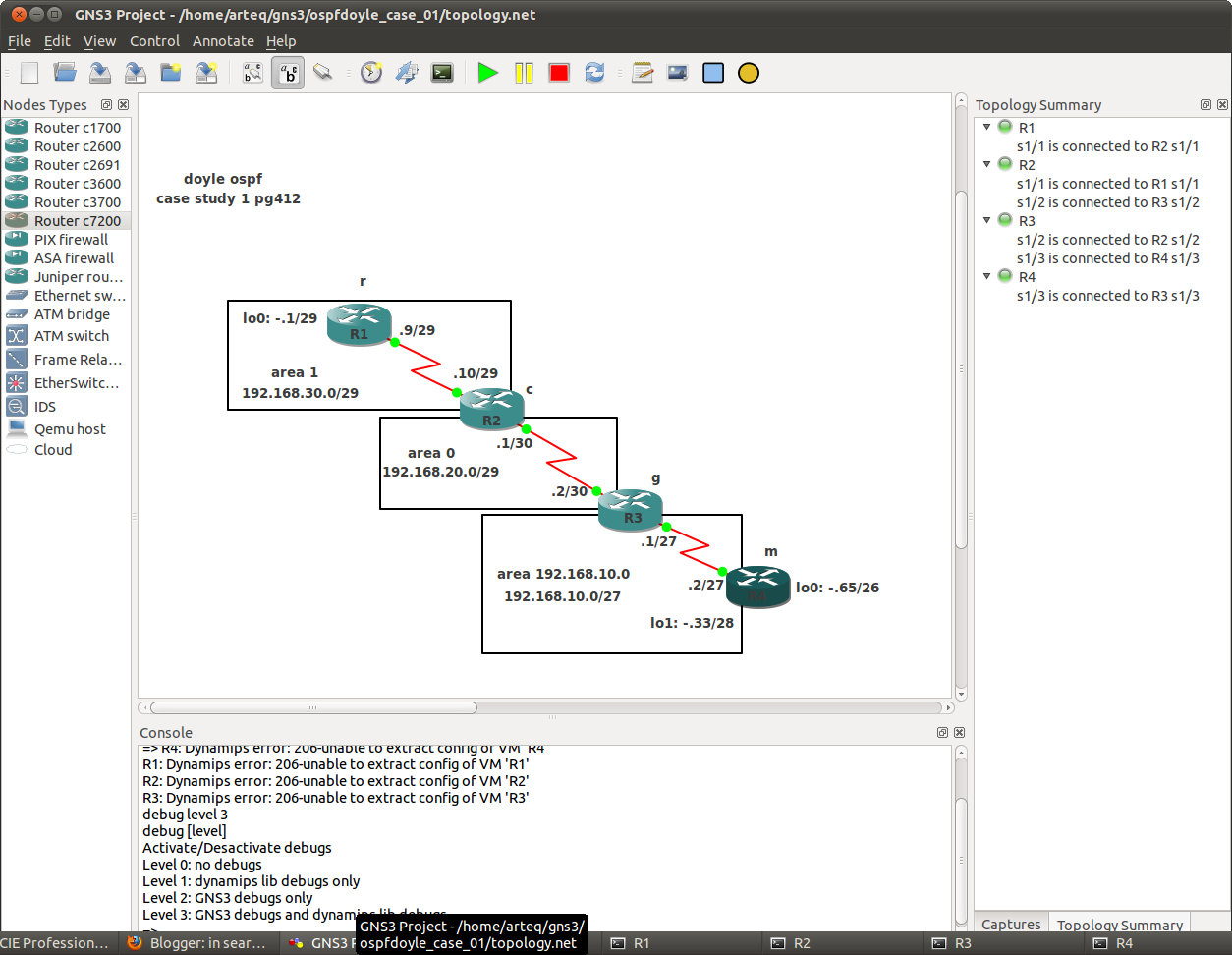
r
int lo0
ip add 192.168.30.1 255.255.255.248
int s1/1
ip add 192.168.30.9 255.255.255.248
clock rat 128000
band 128
no shut
c
int s1/1
ip add 192.168.30.10 255.255.255.248
band 128
no shut
int s1/2
ip add 192.168.20.1 255.255.255.252
clock rat 128000
band 128
no shut
g
int s1/2
ip add 192.168.20.2 255.255.255.252
band 128
no shut
int s1/3
ip add 192.168.10.1 255.255.255.224
clock rat 128000
band 128
no shut
m
int lo0
ip add 192.168.10.65 255.255.255.192
int lo1
ip add 192.168.10.33 255.255.255.240
int s1/3
ip add 192.168.10.2 255.255.255.224
band 128
no shut
the following is a demonstration of the flexibility in the network command...
r
router ospf 10
netw 0.0.0.0 255.255.255.255 area 1
c
router ospf 20
netw 192.168.20.0 0.0.0.255 area 0
netw 192.168.30.0 0.0.0.255 area 1
g
router ospf 30
netw 192.168.20.0 0.0.0.3 area 0.0.0.0
netw 192.168.10.0 0.0.0.31 area 192.168.10.0
m
router ospf 40
netw 192.168.10.2 0.0.0.0 area 192.168.10.0
netw 192.168.10.33 0.0.0.0 area 192.168.10.0
it's ok... jeff doyle is insane and so are you...
m# sh ip route | exc L |inc loop
Gateway of last resort is not set
192.168.10.0/24 is variably subnetted, 6 subnets, 4 masks
C 192.168.10.0/27 is directly connected, Serial1/3
C 192.168.10.32/28 is directly connected, Loopback1
C 192.168.10.64/26 is directly connected, Loopback0
192.168.20.0/30 is subnetted, 1 subnets
O IA 192.168.20.0 [110/1562] via 192.168.10.1, 00:00:33, Serial1/3
192.168.30.0/24 is variably subnetted, 2 subnets, 2 masks
O IA 192.168.30.1/32 [110/2344] via 192.168.10.1, 00:00:33, Serial1/3
O IA 192.168.30.8/29 [110/2343] via 192.168.10.1, 00:00:33, Serial1/3
m#ping 192.168.30.1
Type escape sequence to abort.
Sending 5, 100-byte ICMP Echos to 192.168.30.1, timeout is 2 seconds:
!!!!!
Success rate is 100 percent (5/5), round-trip min/avg/max = 8/13/20 ms
naturally you have a preferred method of tapping out network statements, as i do... and speed is important... this was not speedy, at all...
i think jeff doyle is the red knight...

note that although lo0 on router m does not participate in ospf it is yet the router id... when was the last time you used this command?
m#sh ip ospf 40
Routing Process "ospf 40" with ID 192.168.10.65
Start time: 00:40:44.000, Time elapsed: 00:21:26.372
Supports only single TOS(TOS0) routes
Supports opaque LSA
Supports Link-local Signaling (LLS)
Supports area transit capability
Supports NSSA (compatible with RFC 3101)
Event-log enabled, Maximum number of events: 1000, Mode: cyclic
Router is not originating router-LSAs with maximum metric
Initial SPF schedule delay 5000 msecs
Minimum hold time between two consecutive SPFs 10000 msecs
Maximum wait time between two consecutive SPFs 10000 msecs
Incremental-SPF disabled
Minimum LSA interval 5 secs
Minimum LSA arrival 1000 msecs
LSA group pacing timer 240 secs
Interface flood pacing timer 33 msecs
Retransmission pacing timer 66 msecs
Number of external LSA 0. Checksum Sum 0x000000
Number of opaque AS LSA 0. Checksum Sum 0x000000
Number of DCbitless external and opaque AS LSA 0
Number of DoNotAge external and opaque AS LSA 0
Number of areas in this router is 1. 1 normal 0 stub 0 nssa
Number of areas transit capable is 0
External flood list length 0
IETF NSF helper support enabled
Cisco NSF helper support enabled
Reference bandwidth unit is 100 mbps
Area 192.168.10.0
Number of interfaces in this area is 2 (1 loopback)
Area has no authentication
SPF algorithm last executed 00:21:21.280 ago
SPF algorithm executed 1 times
Area ranges are
Number of LSA 5. Checksum Sum 0x029BF1
Number of opaque link LSA 0. Checksum Sum 0x000000
Number of DCbitless LSA 0
Number of indication LSA 0
Number of DoNotAge LSA 0
Flood list length 0
proof that you can't simply read the book... you have to be the book...
Subscribe to:
Posts (Atom)