Pages

network cisco ccna gns3 certification arteq

network cisco ccna gns3 certification arteq
a network runs through it

Search insearchofthecert

Showing posts with label ospf. Show all posts

Monday, February 11, 2013

area 0...

that old ospf design guide is great...

http://www.cisco.com/en/US/tech/tk365/technologies_white_paper09186a0080094e9e.shtml#t6

The Backbone and Area 0

OSPF has special restrictions when multiple areas are involved. If more than one area is configured, one of these areas has be to be area 0. This is called the backbone. When designing networks it is good practice to start with area 0 and then expand into other areas later on.

The backbone has to be at the center of all other areas, i.e. all areas have to be physically connected to the backbone. The reasoning behind this is that OSPF expects all areas to inject routing information into the backbone and in turn the backbone will disseminate that information into other areas.

 contrast this with what jeff doyle wrote...

Why does OSPF require all traffic between non-backbone areas to pass through a backbone area (area 0)?

Because inter-area OSPF is distance vector, it is vulnerable to routing loops. It avoids loops by mandating a loop-free inter-area topology, in which traffic from one area can only reach another area through area 0. 


Saturday, February 9, 2013

ospf multiple area, summarization, stubs...

i've been saying this for a long time... all of this is over-engineering... it's easily relegated to network trivia, or a "we do it because we can" philosophy... but nobody wants to hear me say it... listen to these guys then...

it is no wonder my mind glazes over when these discussions come up...

http://packetpushers.net/show-134-ospf-design-part-1-debunking-the-multiple-area-myth/

and we'll have an area here and here and here, and this will be a stub, and we'll summarize there, and that needs to be nssa because it sounds cool and we get to use it in a sentence... gimme a break...

passive interface, eigrp and ospf...

this command can certainly be a pain in the ass...

ospf gives you a decent way to detect it with:

R1#sh ip ospf int s1/0.12
Serial1/0.12 is up, line protocol is up
  Internet Address 10.1.1.1/30, Area 12, Attached via Network Statement
  Process ID 1, Router ID 1.1.1.1, Network Type POINT_TO_POINT, Cost: 64
  Topology-MTID    Cost    Disabled    Shutdown      Topology Name
        0           64        no          no            Base
  Transmit Delay is 1 sec, State POINT_TO_POINT
  Timer intervals configured, Hello 10, Dead 40, Wait 40, Retransmit 5
    oob-resync timeout 40
    No Hellos (Passive interface)
  Supports Link-local Signaling (LLS)
  Cisco NSF helper support enabled
  IETF NSF helper support enabled
  Index 2/2, flood queue length 0
  Next 0x0(0)/0x0(0)
  Last flood scan length is 1, maximum is 2
  Last flood scan time is 0 msec, maximum is 12 msec
  Neighbor Count is 0, Adjacent neighbor count is 0
  Suppress hello for 0 neighbor(s)
  Message digest authentication enabled
    Youngest key id is 1

although you have to look; it doesn't jump out at you...

eigrp isn't as friendly...

R4#sh ip eigrp int
EIGRP-IPv4 Interfaces for AS(10)
                              Xmit Queue   PeerQ        Mean   Pacing Time   Multicast    Pending
Interface              Peers  Un/Reliable  Un/Reliable  SRTT   Un/Reliable   Flow Timer   Routes
Fa0/1                    1        0/0       0/0          19       0/0           84           0
R4#config t
Enter configuration commands, one per line.  End with CNTL/Z.
R4(config)#router eigrp 10
R4(config-router)#no passive-int f0/0
R4(config-router)#
*Feb  9 09:45:59.609: %DUAL-5-NBRCHANGE: EIGRP-IPv4 10: Neighbor 10.1.4.6 (FastEthernet0/0) is up: new adjacency
R4(config-router)#do sh ip eigrp int
EIGRP-IPv4 Interfaces for AS(10)
                              Xmit Queue   PeerQ        Mean   Pacing Time   Multicast    Pending
Interface              Peers  Un/Reliable  Un/Reliable  SRTT   Un/Reliable   Flow Timer   Routes
Fa0/1                    1        0/0       0/0          19       0/0           76           0
Fa0/0                    1        0/0       0/0          19       0/0           76           0
R4(config-router)#do sh ip eigrp neigh
EIGRP-IPv4 Neighbors for AS(10)
H   Address                 Interface              Hold Uptime   SRTT   RTO  Q  Seq
                                                   (sec)         (ms)       Cnt Num
0   10.1.4.6                Fa0/0                    11 00:01:17   19   114  0  814
1   10.1.4.10               Fa0/1                    14 00:28:05   19   114  0  788
R4(config-router)#router eigrp 10
R4(config-router)#passive-int f0/0
R4(config-router)#
*Feb  9 09:47:35.717: %DUAL-5-NBRCHANGE: EIGRP-IPv4 10: Neighbor 10.1.4.6 (FastEthernet0/0) is down: interface passive
R4(config-router)#do sh ip eigrp neigh
EIGRP-IPv4 Neighbors for AS(10)
H   Address                 Interface              Hold Uptime   SRTT   RTO  Q  Seq
                                                   (sec)         (ms)       Cnt Num
1   10.1.4.10               Fa0/1                    11 00:28:32   18   108  0  788

the eigrp commands just show you that it's NOT there... debug doesn't help either...

Friday, February 8, 2013

quote of the day; jeff doyle on ospf...

jeff speaks...

Why does OSPF require all traffic between non-backbone areas to pass through a backbone area (area 0)?

Because inter-area OSPF is distance vector, it is vulnerable to routing loops. It avoids loops by mandating a loop-free inter-area topology, in which traffic from one area can only reach another area through area 0.


Every link state router floods information about itself, its links, and its neighbors to every other router. From this flooded information each router builds an identical link state database. Each router then independently runs a shortest-path-first calculation on its database – a local calculation using distributed information – to derive a shortest-path tree. This tree is a sort of map of the shortest path to every other router.

One of the advantages of link state protocols is that the link state database provides a “view” of the entire network, preventing most routing loops. This is in contrast to distance vector protocols, in which route information is passed hop-by-hop through the network and a calculation is performed at each hop – a distributed calculation using local information. Each router along a route is dependent on the router before it to perform its calculations correctly and then correctly pass along the results. When a  router advertises the prefixes it learns to its neighbors it’s basically saying, “I know how to reach these destinations.” And because each distance vector router knows only what its neighbors tell it, and has no “view” of the network beyond the neighbors, the protocol is vulnerable to loops.

The second concept is this:

When link state domains grow large, the flooding and the resulting size of the link state database becomes a scaling problem. The problem is remedied by breaking the routing domain into areas: That first concept is modified so that flooding occurs only within the boundaries of an area, and the resulting link state database contains only information from the routers in the area.  This, in turn, means that each router’s calculated shortest-path tree only describes the path to other routers within the area.

The third concept is this:

OSPF areas are connected by one or more Area Border Routers (the other main link state protocol, IS-IS, connects areas somewhat differently) which maintain a separate link state database and calculate a separate shortest-path tree for each of their connected areas. So an ABR by definition is a member of two or more areas. It advertises the prefixes it learns in one area to its other areas by flooding Type 3 LSAs into the areas that basically say, “I know how to reach these destinations.”

Wait a minute – what that last concept described is not link state, it’s distance vector. The routers in an area cannot “see” past the ABR, and rely on the ABR to correctly tell them what prefixes it can reach. The SPF calculation within an area derives a shortest-path tree that depicts all prefixes beyond the ABR as leaf subnets connected to the ABR at some specified cost.

And that leads us to the answer to the question:

Because inter-area OSPF is distance vector, it is vulnerable to routing loops. It avoids loops by mandating a loop-free inter-area topology, in which traffic from one area can only reach another area through area 0.

Sunday, February 3, 2013

ospf authentication...

every now and then i just have to force myself to do this again and again... can't make mistakes with stupid shit like this during pucker time... this'll kill you on the clock... it's gotta be automatic everywhere you can make it automatic... take no prisoners...

R4#debug ip ospf adj
OSPF adjacency debugging is on
R4#
Feb  3 12:42:38.416: OSPF-1 ADJ   Se1/0.34: Send with youngest Key 1
R4#debug
Feb  3 12:42:47.548: OSPF-1 ADJ   Se1/0.34: Send with youngest Key 1
R4#debug ip ospf pack
OSPF packet debugging is on
R4#
Feb  3 12:42:57.440: OSPF-1 ADJ   Se1/0.34: Send with youngest Key 1
R4#
Feb  3 12:42:58.688: OSPF-1 PAK  : rcv. v:2 t:1 l:48 rid:3.3.3.3 aid:0.0.0.34 chk:0 aut:2 keyid:1 seq:0x510E5419 from Serial1/0.34
R4#
Feb  3 12:43:07.004: OSPF-1 ADJ   Se1/0.34: Send with youngest Key 1
R4#
Feb  3 12:43:08.044: OSPF-1 PAK  : rcv. v:2 t:1 l:48 rid:3.3.3.3 aid:0.0.0.34 chk:0 aut:2 keyid:1 seq:0x510E5422 from Serial1/0.34
R4#un all
All possible debugging has been turned off

version:ospfv2 t:1 hello l:48 length rid: router id aid: area id chk: checksum aut: authentication type keyid: md5 key seq: sequence number

http://www.cisco.com/en/US/docs/ios/12_3/debug/command/reference/dbg_i2g.html#wp1055528


R4#sh ip ospf int s1/0.34
Serial1/0.34 is up, line protocol is up
  Internet Address 10.1.1.10/30, Area 34, Attached via Network Statement
  Process ID 1, Router ID 10.1.4.9, Network Type POINT_TO_POINT, Cost: 64
  Topology-MTID    Cost    Disabled    Shutdown      Topology Name
        0           64        no          no            Base
  Transmit Delay is 1 sec, State POINT_TO_POINT
  Timer intervals configured, Hello 10, Dead 40, Wait 40, Retransmit 5
    oob-resync timeout 40
    Hello due in 00:00:01
  Supports Link-local Signaling (LLS)
  Cisco NSF helper support enabled
  IETF NSF helper support enabled
  Index 1/1, flood queue length 0
  Next 0x0(0)/0x0(0)
  Last flood scan length is 5, maximum is 5
  Last flood scan time is 0 msec, maximum is 4 msec
  Neighbor Count is 1, Adjacent neighbor count is 1
    Adjacent with neighbor 3.3.3.3
  Suppress hello for 0 neighbor(s)
  Message digest authentication enabled
    Youngest key id is 1
R4#config t
Enter configuration commands, one per line.  End with CNTL/Z.
R4(config)#int s1/0.34
R4(config-subif)#no ip ospf authenti mess
R4(config-subif)#no ip ospf message-digest-key 1 md5 cisco
R4(config-subif)#
Feb  3 12:56:56.259: %OSPF-5-ADJCHG: Process 1, Nbr 3.3.3.3 on Serial1/0.34 from FULL to DOWN, Neighbor Down: Dead timer expired
R4(config-subif)#do sh ip ospf int s1/0.34
Serial1/0.34 is up, line protocol is up
  Internet Address 10.1.1.10/30, Area 34, Attached via Network Statement
  Process ID 1, Router ID 10.1.4.9, Network Type POINT_TO_POINT, Cost: 64
  Topology-MTID    Cost    Disabled    Shutdown      Topology Name
        0           64        no          no            Base
  Transmit Delay is 1 sec, State POINT_TO_POINT
  Timer intervals configured, Hello 10, Dead 40, Wait 40, Retransmit 5
    oob-resync timeout 40
    Hello due in 00:00:01
  Supports Link-local Signaling (LLS)
  Cisco NSF helper support enabled
  IETF NSF helper support enabled
  Index 1/1, flood queue length 0
  Next 0x0(0)/0x0(0)
  Last flood scan length is 5, maximum is 5
  Last flood scan time is 0 msec, maximum is 4 msec
  Neighbor Count is 0, Adjacent neighbor count is 0
  Suppress hello for 0 neighbor(s)
  (no messass digest crap here where it's supposed to be)

R4(config-subif)#ip ospf authen mess
R4(config-subif)#ip ospf message-digest-key 1 md5 cisco
R4(config-subif)#end
Feb  3 12:57:42.875: %OSPF-5-ADJCHG: Process 1, Nbr 3.3.3.3 on Serial1/0.34 from LOADING to FULL, Loading Done
R4(config-subif)#end
R4#
Feb  3 12:57:45.391: %SYS-5-CONFIG_I: Configured from console by console
R4#sh ip ospf int s1/0.34
Serial1/0.34 is up, line protocol is up
  Internet Address 10.1.1.10/30, Area 34, Attached via Network Statement
  Process ID 1, Router ID 10.1.4.9, Network Type POINT_TO_POINT, Cost: 64
  Topology-MTID    Cost    Disabled    Shutdown      Topology Name
        0           64        no          no            Base
  Transmit Delay is 1 sec, State POINT_TO_POINT
  Timer intervals configured, Hello 10, Dead 40, Wait 40, Retransmit 5
    oob-resync timeout 40
    Hello due in 00:00:04
  Supports Link-local Signaling (LLS)
  Cisco NSF helper support enabled
  IETF NSF helper support enabled
  Index 1/1, flood queue length 0
  Next 0x0(0)/0x0(0)
  Last flood scan length is 1, maximum is 5
  Last flood scan time is 0 msec, maximum is 4 msec
  Neighbor Count is 1, Adjacent neighbor count is 1
    Adjacent with neighbor 3.3.3.3
  Suppress hello for 0 neighbor(s)
  Message digest authentication enabled
    Youngest key id is 1

Saturday, February 2, 2013

ospf area id is a 32 bit number...

just like an ip address... in other words an ospf area id of 1 can also be expressed as 0.0.0.1 on one side and  1 on the other...

network 10.1.1.0 0.0.0.255 area 0.0.0.1

and

network 10.1.1.0 0.0.0.255 area 1

these networks have the same area id... easy enough...

what is 2^32? all 1's or f's or 255's, or...


4,294,967,295

which of course is 4,294,967,296 total numbers because of the 0...

area id 0.0.1.1 = area id 257

that's a scott morris example right there... God forbid you get hit with this kind of bullshit on d-day... and that's an easy one...

why does 0.0.1.1 = 257?

because 1 in the 3rd octet is the 24th bit place holder from the left which equals 256 and 1 in the 4th octet is the 32nd bit place holder from the left which equals 1...

as you can see below...


another easy example:

area id 271

that is 256 + 15

0.0.1.15


0.0.2.15 and it starts to suck

the last four place holders = 15 as before but in the third octet we've moved up a place holder

512 256 128 64 32 16 8 4 2 1

512 + 15 = 527


get comfortable with all the powers of 2, because that ain't nice...

it gets worse...

area id 0.0.3.0 = 768 because

512 256 128 64 32 16 8 4 2 1

you have to start adding the big place holders...

area id 1024 is

1024 512 256 128 64 32 16 8 4 2 1

or 0.0.4.0


knock yourself out...

Friday, January 25, 2013

max-metric router-lsa on-startup wait-for-bgp...

o yeah, it's real, you should say something...

an infinite cost can be advertised by an ospf transit router until bgp comes up...

benefit:  http://www.cisco.com/en/US/products/ps6599/products_white_paper09186a00800ade18.shtml

  • Graceful removal of an OSPF router from networks (i.e. to upgrade software or to perform maintenance) and reduction in packet drop

  • Reduce black-hole packet dropping when interacting with BGP
makes a transit router a stub router without making it a stub router...

this is very exciting...

It can be desirable to have a router in a network that is not a transit router. A "transit router" forwards traffic that is not destined for networks directly connected to the router. A router that only forwards packets destined to its directly connected links is known as a "stub router". In OSPF networks, a router could become a stub router by advertising large metrics for its connected links, so that the cost of a path through this router becomes larger than that of an alternative path. It does not matter what specific metrics are advertised in a stub network that is connected to the router, because data must reach the network via the stub router itself.

and you thought it was safe to go back in the water...

infinity is 16,777,215 in ospf...

that's 2^24 = 16,777,216

this is better than coffee first thing in the morning...

quote of the day... ospf auth...

you have been warned...

NOTE 
OSPF authentication is a good place for tricky CCIE lab questions—ones that can be solved in a few minutes if you know all the intricacies.

of course...  authentication can create havoc with routing protocols... and yes, the configuration for eigrp, ospf and bgp are unique to each routing protocol...

so what's the plan... you hate it so much that you love it... like frame relay, dtp, vtp, or whatever your particular hateful protocol might be...

bring the hate and you will find the love...

the devil's in the details, baby...

Thursday, January 24, 2013

ccie... concentrate...

this is a companion to an earlier post...

i've heard complaints about wendell's cert guide for ccie r&s... regardless of the complaints it is a must read... end of story there...

it is very long but so is this adventure... by contrast the ccie quick reference is only 250 pages... i have to laugh as i look at that... quick ref, only 250 pages, there's some irony in that...

here's the thing; yeah i'm gonna tell you the thing... this stuff is not meant to be read like normal human's would read...  you have to dissect this shit with a microscope...

here's an example:

i have read various articles about the elusive lsa type 4, and i'm pretty sure i have a good handle on that one... elaborate articles, with configuration examples, output, all that...

if you are simply reading, which means, looking, you will miss this:

When an ABR then floods the type 5 LSA into another area, the ABR creates a type 4 LSA, listing the ABR’s metric to reach the ASBR that created the type 5 LSA.

it is frightening how you can convince yourself you got it when you read it when in fact you missed the whole thing...

the ABR creates a type 4 LSA, listing the ABR’s metric to reach the ASBR that created the type 5 LSA.

now that's the thing 

the ABR creates a type 4 LSA, listing the ABR’s metric to reach the ASBR that created the type 5 LSA.

the ABR creates a type 4 LSA, listing the ABR’s metric to reach the ASBR that created the type 5 LSA.  

quote of the day... odom

wendell, you have the floor:

Neighbors—Two routers that share a common data link, that exchange Hello messages, and the Hellos must match for certain parameters.


Adjacent (fully adjacent)—Two neighbors that have completed the process of fully exchanging DD and LSU packets directly between each other.

and further (this is the big one)

if a DR is elected, the election occurs after the routers have become
neighbors, but before they send DD packets and reach the ExStart neighbor state. When an OSPF router reaches the 2-way state with the first neighbor on an interface, it has already received at least one Hello from that neighbor.


translation:

after neighbors but before adjacency:

hellos begin at init...

two-way is established upon hello reception NEIGHBORS

exstart determines master/slave

exchange (exchange dd)

loading compare dd... bring lsa's up to speed with lsr's... ACKNOWLEDGE

full = synchronization

Sunday, January 13, 2013

more fun with lsa's...

r3 is now ospf area 1, r4 is now eigrp 1... how many lsa types...

R1#sh ip ospf data router

            OSPF Router with ID (1.1.1.1) (Process ID 1)

        Router Link States (Area 0)

  LS age: 904
  Options: (No TOS-capability, DC)
  LS Type: Router Links
  Link State ID: 1.1.1.1
  Advertising Router: 1.1.1.1
  LS Seq Number: 8000004E
  Checksum: 0xE4C9
  Length: 48
  Number of Links: 2

    Link connected to: a Stub Network
     (Link ID) Network/subnet number: 1.1.1.0
     (Link Data) Network Mask: 255.255.255.0
      Number of MTID metrics: 0
       TOS 0 Metrics: 1

    Link connected to: a Transit Network
     (Link ID) Designated Router address: 10.1.1.2
     (Link Data) Router Interface address: 10.1.1.1
      Number of MTID metrics: 0
       TOS 0 Metrics: 1


  Routing Bit Set on this LSA in topology Base with MTID 0
  LS age: 639
  Options: (No TOS-capability, DC)
  LS Type: Router Links
  Link State ID: 2.2.2.2
  Advertising Router: 2.2.2.2
  LS Seq Number: 80000050
  Checksum: 0xE3B7
  Length: 48
  Area Border Router
  AS Boundary Router
  Number of Links: 2

    Link connected to: a Stub Network
     (Link ID) Network/subnet number: 2.2.2.2
     (Link Data) Network Mask: 255.255.255.255
      Number of MTID metrics: 0
       TOS 0 Metrics: 1
         
    Link connected to: a Transit Network
     (Link ID) Designated Router address: 10.1.1.2
     (Link Data) Router Interface address: 10.1.1.2
      Number of MTID metrics: 0
       TOS 0 Metrics: 1


R1#sh ip ospf data netw

            OSPF Router with ID (1.1.1.1) (Process ID 1)

        Net Link States (Area 0)

  Routing Bit Set on this LSA in topology Base with MTID 0
  LS age: 1232
  Options: (No TOS-capability, DC)
  LS Type: Network Links
  Link State ID: 10.1.1.2 (address of Designated Router)
  Advertising Router: 2.2.2.2
  LS Seq Number: 80000014
  Checksum: 0x6FE
  Length: 32
  Network Mask: /24
    Attached Router: 2.2.2.2
    Attached Router: 1.1.1.1

R1#sh ip ospf data summ

            OSPF Router with ID (1.1.1.1) (Process ID 1)

        Summary Net Link States (Area 0)

  Routing Bit Set on this LSA in topology Base with MTID 0
  LS age: 610
  Options: (No TOS-capability, DC, Upward)
  LS Type: Summary Links(Network)
  Link State ID: 3.3.3.3 (summary Network Number)
  Advertising Router: 2.2.2.2
  LS Seq Number: 80000001
  Checksum: 0xD650
  Length: 28
  Network Mask: /32
    MTID: 0     Metric: 2

  Routing Bit Set on this LSA in topology Base with MTID 0
  LS age: 648
  Options: (No TOS-capability, DC, Upward)
  LS Type: Summary Links(Network)
  Link State ID: 192.168.1.0 (summary Network Number)
  Advertising Router: 2.2.2.2
  LS Seq Number: 80000001
  Checksum: 0x9A2F
  Length: 28
  Network Mask: /24
    MTID: 0     Metric: 1

R1#sh ip ospf data asbr

            OSPF Router with ID (1.1.1.1) (Process ID 1)

        Summary ASB Link States (Area 0)

  Routing Bit Set on this LSA in topology Base with MTID 0
  LS age: 328
  Options: (No TOS-capability, DC, Upward)
  LS Type: Summary Links(AS Boundary Router)
  Link State ID: 3.3.3.3 (AS Boundary Router address)
  Advertising Router: 2.2.2.2
  LS Seq Number: 80000001
  Checksum: 0xBE68
  Length: 28
  Network Mask: /0
    MTID: 0     Metric: 1

R1#sh ip ospf data ext

            OSPF Router with ID (1.1.1.1) (Process ID 1)

        Type-5 AS External Link States

  Routing Bit Set on this LSA in topology Base with MTID 0
  LS age: 344
  Options: (No TOS-capability, DC, Upward)
  LS Type: AS External Link
  Link State ID: 4.4.4.0 (External Network Number )
  Advertising Router: 3.3.3.3
  LS Seq Number: 80000001
  Checksum: 0xFC8B
  Length: 36
  Network Mask: /24
    Metric Type: 2 (Larger than any link state path)
    MTID: 0
    Metric: 20
    Forward Address: 0.0.0.0
    External Route Tag: 0

  Routing Bit Set on this LSA in topology Base with MTID 0
  LS age: 344
  Options: (No TOS-capability, DC, Upward)
  LS Type: AS External Link
  Link State ID: 172.16.1.0 (External Network Number )
  Advertising Router: 3.3.3.3
  LS Seq Number: 80000001
  Checksum: 0xFCD9
  Length: 36
  Network Mask: /24
    Metric Type: 2 (Larger than any link state path)
    MTID: 0
    Metric: 20
    Forward Address: 0.0.0.0
    External Route Tag: 0

without changing the physical topology, how do you get this as well as the other five types... (easy one)

R2#sh ip ospf data nssa

            OSPF Router with ID (2.2.2.2) (Process ID 1)

        Type-7 AS External Link States (Area 1)

  Routing Bit Set on this LSA in topology Base with MTID 0
  LS age: 682
  Options: (No TOS-capability, Type 7/5 translation, DC, Upward)
  LS Type: AS External Link
  Link State ID: 4.4.4.0 (External Network Number )
  Advertising Router: 3.3.3.3
  LS Seq Number: 80000001
  Checksum: 0xFE73
  Length: 36
  Network Mask: /24
    Metric Type: 2 (Larger than any link state path)
    MTID: 0
    Metric: 20
    Forward Address: 3.3.3.3
    External Route Tag: 0

  Routing Bit Set on this LSA in topology Base with MTID 0
  LS age: 682
  Options: (No TOS-capability, Type 7/5 translation, DC, Upward)
  LS Type: AS External Link
  Link State ID: 172.16.1.0 (External Network Number )
  Advertising Router: 3.3.3.3
  LS Seq Number: 80000001
  Checksum: 0xFEC1
  Length: 36
  Network Mask: /24
    Metric Type: 2 (Larger than any link state path)
    MTID: 0
    Metric: 20
    Forward Address: 3.3.3.3
    External Route Tag: 0

it is important to note that the nssa lsa won't show up on r1, but the rest do...

R1#sh ip ospf data nssa

            OSPF Router with ID (1.1.1.1) (Process ID 1)
R1#
 

fun with lsa's...

the lsa  information you can find in wireshark captures is the same information you can get from a router in the network... but you knew that...

given this simple topology, r1 and r2 are area 0 ospf, while r2's f0/1 is eigrp 1 with r3... r2 redistributes...

how many different types of lsa's will be produced from this network? this is not a trick question...  there will be three types... router, network and external...

r2 is neither an abr nor an asbr... the lsa's don't lie...

R1#sh ip ospf data router

            OSPF Router with ID (1.1.1.1) (Process ID 1)

        Router Link States (Area 0)

  LS age: 783
  Options: (No TOS-capability, DC)
  LS Type: Router Links
  Link State ID: 1.1.1.1
  Advertising Router: 1.1.1.1
  LS Seq Number: 8000004D
  Checksum: 0xE6C8
  Length: 48
  Number of Links: 2

    Link connected to: a Stub Network
     (Link ID) Network/subnet number: 1.1.1.0
     (Link Data) Network Mask: 255.255.255.0
      Number of MTID metrics: 0
       TOS 0 Metrics: 1

    Link connected to: a Transit Network
     (Link ID) Designated Router address: 10.1.1.2
         
R1#sh ip ospf data netw

            OSPF Router with ID (1.1.1.1) (Process ID 1)

        Net Link States (Area 0)

  Routing Bit Set on this LSA in topology Base with MTID 0
  LS age: 1131
  Options: (No TOS-capability, DC)
  LS Type: Network Links
  Link State ID: 10.1.1.2 (address of Designated Router)
  Advertising Router: 2.2.2.2
  LS Seq Number: 80000013
  Checksum: 0x8FD
  Length: 32
  Network Mask: /24
    Attached Router: 2.2.2.2
    Attached Router: 1.1.1.1

R1#sh ip ospf data summ

            OSPF Router with ID (1.1.1.1) (Process ID 1)
R1#sh ip ospf data asbr

            OSPF Router with ID (1.1.1.1) (Process ID 1)

R1#sh ip ospf data external

            OSPF Router with ID (1.1.1.1) (Process ID 1)

        Type-5 AS External Link States

  Routing Bit Set on this LSA in topology Base with MTID 0
  LS age: 1037
  Options: (No TOS-capability, DC, Upward)
  LS Type: AS External Link
  Link State ID: 3.3.3.0 (External Network Number )
  Advertising Router: 2.2.2.2
  LS Seq Number: 80000001
  Checksum: 0x3F50
  Length: 36
  Network Mask: /24
    Metric Type: 2 (Larger than any link state path)
    MTID: 0
    Metric: 20
    Forward Address: 0.0.0.0
    External Route Tag: 0

  Routing Bit Set on this LSA in topology Base with MTID 0
  LS age: 1037
  Options: (No TOS-capability, DC, Upward)
  LS Type: AS External Link
  Link State ID: 192.168.1.0 (External Network Number )
  Advertising Router: 2.2.2.2
  LS Seq Number: 80000001
  Checksum: 0xEE3F
  Length: 36
  Network Mask: /24
    Metric Type: 2 (Larger than any link state path)
    MTID: 0
    Metric: 20
    Forward Address: 0.0.0.0
    External Route Tag: 0

note the output for summary and asbr above show only a router id...

R1#sh ip ospf data ?
  adv-router        Advertising Router link states
  asbr-summary      ASBR summary link states
  database-summary  Summary of database
  external          External link states
  internal          Internal LSA information
  multicast         Multicast Topology
  network           Network link states
  nssa-external     NSSA External link states
  opaque-area       Opaque Area link states
  opaque-as         Opaque AS link states
  opaque-link       Opaque Link-Local link states
  router            Router link states
  self-originate    Self-originated link states
  summary           Network summary link states
  topology          Unicast Topology
  |                 Output modifiers

1 router
2 network
3 summary
4 asbr summary
5 external
7 nssa

Saturday, January 12, 2013

show ip ospf database router...

and optionally, router id...

i never use this one, but i should...

a great command to show you this router, or your neighbor's stuff...


Thursday, January 10, 2013

ospf transit capability...

on or off in virtual links... (it's on by default) an excellent article from petr laphukov from INE about this distinction...

http://blog.ine.com/2009/09/14/understanding-ospf-transit-capability/

also in rfc 2328...  have you even read rfc 2328 yet?

what the hell are you waiting for...


Friday, December 14, 2012

proof of concept... gns3 and breakout...

all the elements are together, and it's working...

the 3750 is truly invisible with the tunneling... kind of a shame for such a nice switch, but in the end i probably saved 2 grand between a gns3 server and quad nic's...

a lot of work and a lot to keep straight... layer 3 is working fine... and i haven't seen any mtu inspired errors in ospf yet, having upped the system mtu's where needed...

damn... of course this is on the list:

 http://blog.ipexpert.com/2011/02/28/gns3-and-physical-switches-breakout-switch/#more-6136

using ubu 12.04 and it doesn't really dig all the network screwing around... i lost my wireless connection for a few hours...

core1#sh cdp neigh                                                             
Capability Codes: R - Router, T - Trans Bridge, B - Source Route Bridge        
                  S - Switch, H - Host, I - IGMP, r - Repeater, P - Phone,     
                  D - Remote, C - CVTA, M - Two-port Mac Relay                 
                                                                               
Device ID        Local Intrfce     Holdtme    Capability  Platform  Port ID    
agg1.ozlan       Fas 0/1           160             R S I  WS-C3560- Fas 0/1    
agg1.ozlan       Fas 0/2           160             R S I  WS-C3560- Fas 0/2    
agg2.ozlan       Fas 0/5           176             R S I  WS-C3560- Fas 0/5    
agg2.ozlan       Fas 0/6           176             R S I  WS-C3560- Fas 0/6    
gns3rtr1.ozlan   Fas 0/24          179               R    7206VXR   Fas 0/0    
gns3rtr3.ozlan   Fas 0/23          163               R    7206VXR   Fas 0/0 

gns3rtr3#sh ip route ospf

Gateway of last resort is not set

      1.0.0.0/32 is subnetted, 1 subnets
O        1.0.0.1 [110/2] via 10.30.1.1, 00:02:45, FastEthernet0/0
      2.0.0.0/32 is subnetted, 1 subnets
O        2.0.0.2 [110/3] via 10.30.1.1, 00:02:45, FastEthernet0/0
      3.0.0.0/32 is subnetted, 1 subnets
O        3.0.0.3 [110/3] via 10.30.1.1, 00:02:45, FastEthernet0/0
      4.0.0.0/24 is subnetted, 1 subnets
O        4.0.0.0 [110/3] via 10.30.1.1, 00:02:45, FastEthernet0/0
      10.0.0.0/8 is variably subnetted, 5 subnets, 2 masks
O        10.1.10.0/24 [110/2] via 10.30.1.1, 00:02:45, FastEthernet0/0
O        10.1.100.0/24 [110/2] via 10.30.1.1, 00:02:45, FastEthernet0/0
O        10.1.200.0/24 [110/2] via 10.30.1.1, 00:02:45, FastEthernet0/0
      172.16.0.0/24 is subnetted, 1 subnets
O        172.16.1.0 [110/2] via 10.30.1.1, 00:02:45, FastEthernet0/0
gns3rtr3#

gns3rtr1#ping 10.30.1.2
Type escape sequence to abort.
Sending 5, 100-byte ICMP Echos to 10.30.1.2, timeout is 2 seconds:
!!!!!
Success rate is 100 percent (5/5), round-trip min/avg/max = 16/19/20 ms

gns3rtr3#ping 10.1.10.112
Type escape sequence to abort.
Sending 5, 100-byte ICMP Echos to 10.1.10.112, timeout is 2 seconds:
.!!!!
Success rate is 80 percent (4/5), round-trip min/avg/max = 8/11/12 ms

i'm going to build the 3 tshoot topologies also... once i get comfortable with it, i'll post a step by step...

quick tip... sudo /etc/init.d/networking restart has been deprecated... the new command is sudo service networking restart...  that's a command you'll use often...

Sunday, November 25, 2012

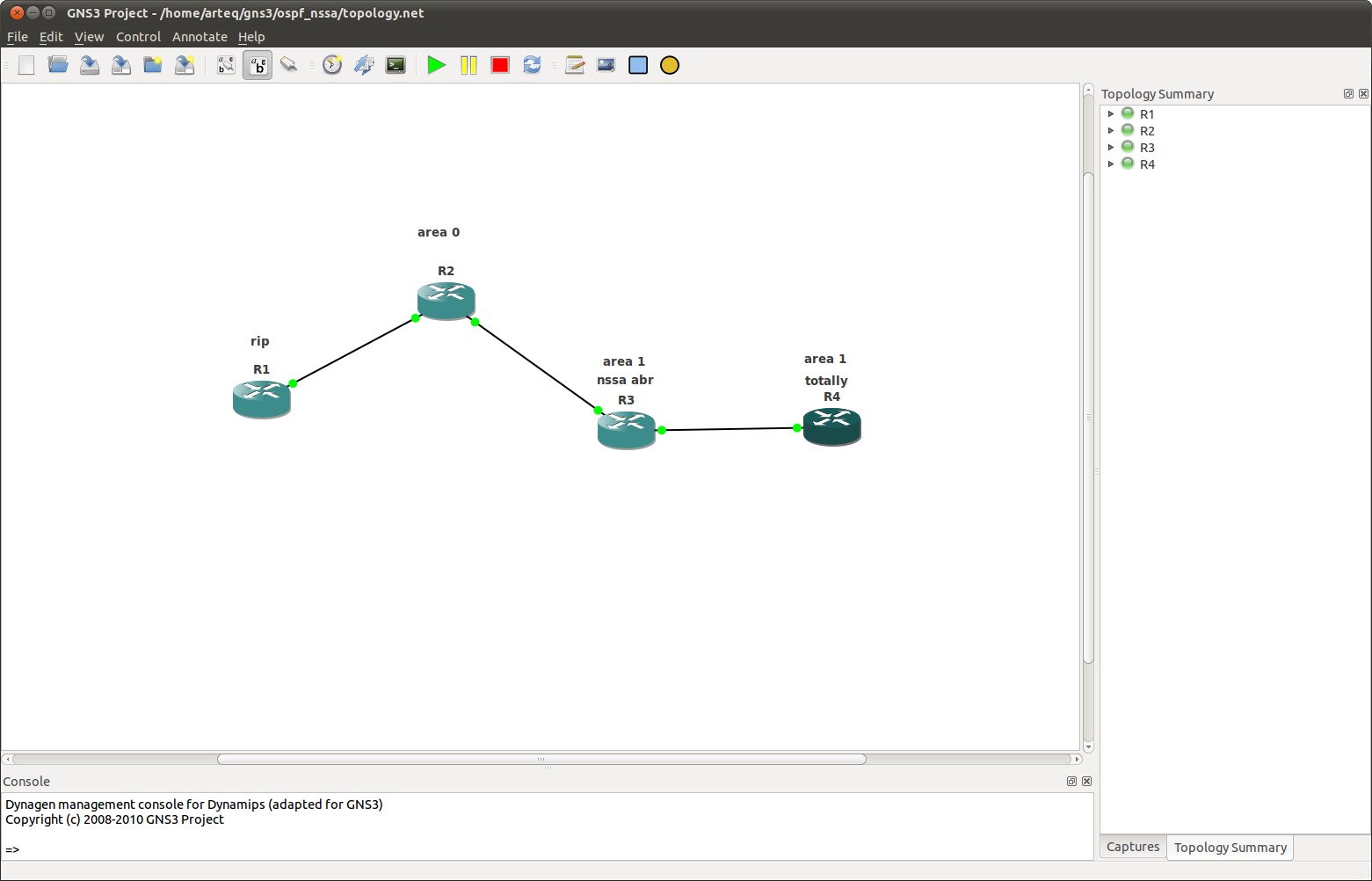
area types and lsa's part deux...

continuing from the last post...


basic... rip and ospf haven't been redistributed yet, and nssa is not yet in effect...

r4#sh ip ospf data

            OSPF Router with ID (4.4.4.4) (Process ID 1)

        Router Link States (Area 1)

Link ID         ADV Router      Age         Seq#       Checksum Link count
2.2.2.2         2.2.2.2         444         0x80000002 0x0061A3 1
3.3.3.3         3.3.3.3         240         0x80000005 0x009413 3
4.4.4.4         4.4.4.4         229         0x80000003 0x00F5D4 2

        Net Link States (Area 1)

Link ID         ADV Router      Age         Seq#       Checksum
10.1.2.1        2.2.2.2         444         0x80000001 0x008F80
10.1.4.3        3.3.3.3         240         0x80000001 0x009B64

        Summary Net Link States (Area 1)

Link ID         ADV Router      Age         Seq#       Checksum
2.2.2.2         2.2.2.2         586         0x80000001 0x00FA31
10.1.1.0        2.2.2.2         606         0x80000001 0x00BD6A
r4#

lsa types 1,2 and 3 are represented on r4, as expected...


we'll first redist rip and ospf...

 r4#sh ip ospf data

            OSPF Router with ID (4.4.4.4) (Process ID 1)

        Router Link States (Area 1)

Link ID         ADV Router      Age         Seq#       Checksum Link count
2.2.2.2         2.2.2.2         41          0x80000005 0x00619E 1
3.3.3.3         3.3.3.3         1359        0x80000005 0x009413 3
4.4.4.4         4.4.4.4         67          0x80000005 0x00F1D6 2

        Net Link States (Area 1)

Link ID         ADV Router      Age         Seq#       Checksum
10.1.2.1        2.2.2.2         1562        0x80000001 0x008F80
10.1.4.3        3.3.3.3         1358        0x80000001 0x009B64

        Summary Net Link States (Area 1)

Link ID         ADV Router      Age         Seq#       Checksum
2.2.2.2         2.2.2.2         1704        0x80000001 0x00FA31
10.1.1.0        2.2.2.2         1724        0x80000001 0x00BD6A

        Type-5 AS External Link States
          
Link ID         ADV Router      Age         Seq#       Checksum Tag
1.0.0.0         2.2.2.2         40          0x80000001 0x003456 0
r4#

now we have the expected external type on r4...

and for completeness, rip has picked up some new friends...

rip#sh ip route rip

Gateway of last resort is not set

R     2.0.0.0/8 [120/5] via 10.1.1.2, 00:00:27, FastEthernet0/0
R     3.0.0.0/8 [120/5] via 10.1.1.2, 00:00:27, FastEthernet0/0
R     4.0.0.0/8 [120/5] via 10.1.1.2, 00:00:27, FastEthernet0/0
      10.0.0.0/8 is variably subnetted, 4 subnets, 2 masks
R        10.1.2.0/24 [120/1] via 10.1.1.2, 00:00:27, FastEthernet0/0
R        10.1.4.0/24 [120/5] via 10.1.1.2, 00:00:27, FastEthernet0/0

back to stubs...

to make area 1 a stub include the abr (in this case the bb or r1) and r3... the rule is that all routers in stub areas participate in being stubs... in other words, if we simply made r3 a stub, it would  lose it's adjacency...

r2#sh ip ospf
omitted
 Area 1
        Number of interfaces in this area is 1
        It is a stub area

r3 has it's adjacency to r1 but no longer has type 5's...

r3#sh ip ospf data

            OSPF Router with ID (3.3.3.3) (Process ID 1)

        Router Link States (Area 1)

Link ID         ADV Router      Age         Seq#       Checksum Link count
2.2.2.2         2.2.2.2         533         0x80000007 0x008976 1
3.3.3.3         3.3.3.3         532         0x80000008 0x0018A0 3
4.4.4.4         4.4.4.4         1273        0x80000005 0x00F1D6 2

        Net Link States (Area 1)

Link ID         ADV Router      Age         Seq#       Checksum
10.1.2.3        3.3.3.3         532         0x80000001 0x006BA0

        Summary Net Link States (Area 1)

Link ID         ADV Router      Age         Seq#       Checksum
0.0.0.0         2.2.2.2         537         0x80000001 0x0075C0
2.2.2.2         2.2.2.2         537         0x80000003 0x001517
10.1.1.0        2.2.2.2         537         0x80000003 0x00D750

make area 1 totally stubby by adding no-summary to r2...

on r2 sh ip ospf:

Area 1
        Number of interfaces in this area is 1
        It is a stub area, no summary LSA in this area
        Generates stub default route with cost 1

r3#sh ip ospf data

            OSPF Router with ID (3.3.3.3) (Process ID 1)

        Router Link States (Area 1)

Link ID         ADV Router      Age         Seq#       Checksum Link count
2.2.2.2         2.2.2.2         847         0x80000007 0x008976 1
3.3.3.3         3.3.3.3         846         0x80000008 0x0018A0 3
4.4.4.4         4.4.4.4         1587        0x80000005 0x00F1D6 2

        Net Link States (Area 1)

Link ID         ADV Router      Age         Seq#       Checksum
10.1.2.3        3.3.3.3         846         0x80000001 0x006BA0

        Summary Net Link States (Area 1)

Link ID         ADV Router      Age         Seq#       Checksum
0.0.0.0         2.2.2.2         163         0x80000003 0x0071C2

change to nssa on r2 and r3 and we have:

r3#sh ip ospf data

            OSPF Router with ID (3.3.3.3) (Process ID 1)

        Router Link States (Area 1)

Link ID         ADV Router      Age         Seq#       Checksum Link count
2.2.2.2         2.2.2.2         21          0x8000000B 0x000FE2 1
3.3.3.3         3.3.3.3         20          0x8000000C 0x009715 3
4.4.4.4         4.4.4.4         95          0x80000007 0x0004C1 2

        Net Link States (Area 1)

Link ID         ADV Router      Age         Seq#       Checksum
10.1.2.3        3.3.3.3         15          0x80000005 0x00EA15
10.1.4.4        4.4.4.4         95          0x80000001 0x006397

        Summary Net Link States (Area 1)

Link ID         ADV Router      Age         Seq#       Checksum
2.2.2.2         2.2.2.2         22          0x80000004 0x009A88
10.1.1.0        2.2.2.2         22          0x80000004 0x005DC1

        Type-7 AS External Link States (Area 1)
         
Link ID         ADV Router      Age         Seq#       Checksum Tag
1.0.0.0         2.2.2.2         21          0x80000001 0x008213 0


just like in the stub scenario, r4 will have to become an nssa also to particpate... all routers in the area...

r4(config-router)#no area 1 nssa
r4(config-router)#
*Nov 25 14:40:10.931: %OSPF-5-ADJCHG: Process 1, Nbr 3.3.3.3 on FastEthernet0/0 from FULL to DOWN, Neighbor Down: Adjacency forced to reset

add area 1 nssa no-summary to r2 and:

r3#sh ip ospf data

            OSPF Router with ID (3.3.3.3) (Process ID 1)

        Router Link States (Area 1)

Link ID         ADV Router      Age         Seq#       Checksum Link count
2.2.2.2         2.2.2.2         186         0x8000000C 0x000DE3 1
3.3.3.3         3.3.3.3         96          0x80000010 0x007E15 3
4.4.4.4         4.4.4.4         97          0x8000000B 0x00A11A 2

        Net Link States (Area 1)

Link ID         ADV Router      Age         Seq#       Checksum
10.1.2.3        3.3.3.3         544         0x80000005 0x00EA15
10.1.4.4        4.4.4.4         93          0x80000005 0x0001EF

        Summary Net Link States (Area 1)

Link ID         ADV Router      Age         Seq#       Checksum
0.0.0.0         2.2.2.2         14          0x80000001 0x00FC31

        Type-7 AS External Link States (Area 1)

Link ID         ADV Router      Age         Seq#       Checksum Tag
1.0.0.0         2.2.2.2         550         0x80000001 0x008213 0

on r2:

 Area 1
        Number of interfaces in this area is 1
        It is a NSSA area
        Perform type-7/type-5 LSA translation


Sunday, November 18, 2012

arden ospf filters, take 3....

nice database...

R5#sh ip ospf data

            OSPF Router with ID (5.5.5.5) (Process ID 1)

        Router Link States (Area 1)

Link ID         ADV Router      Age         Seq#       Checksum Link count
3.3.3.3         3.3.3.3         1646        0x80000004 0x001133 2
4.4.4.4         4.4.4.4         1611        0x80000003 0x0037CE 3
5.5.5.5         5.5.5.5         1609        0x80000005 0x008F64 3

        Net Link States (Area 1)

Link ID         ADV Router      Age         Seq#       Checksum
10.1.34.3       3.3.3.3         1712        0x80000001 0x005091
10.1.35.3       3.3.3.3         1646        0x80000001 0x007765
10.1.45.4       4.4.4.4         1610        0x80000001 0x0003C6

        Summary Net Link States (Area 1)

Link ID         ADV Router      Age         Seq#       Checksum
1.1.1.1         3.3.3.3         1769        0x80000001 0x001516
2.2.2.2         3.3.3.3         1769        0x80000001 0x00E640
3.3.3.3         3.3.3.3         1769        0x80000001 0x00AE75
10.0.12.0       3.3.3.3         1769        0x80000001 0x003CDC
10.0.13.0       3.3.3.3         1769        0x80000001 0x0027F1
10.0.23.0       3.3.3.3         1769        0x80000001 0x00B856
R5#

permit  the 3.3.3.3 route...

R5#config t
Enter configuration commands, one per line.  End with CNTL/Z.
R5(config)#access-list 1 permit 3.3.3.3
R5(config)#router ospf 1
R5(config-router)#distribute-list 1 in
R5(config-router)#end
R5#
*Nov 18 12:34:29.983: %SYS-5-CONFIG_I: Configured from console by console
 
R5#sh ip route | excl L | incl loop
 
Gateway of last resort is not set

      3.0.0.0/32 is subnetted, 1 subnets
O IA     3.3.3.3 [110/2] via 10.1.35.3, 00:00:18, FastEthernet1/0
      5.0.0.0/32 is subnetted, 1 subnets
C        5.5.5.5 is directly connected, Loopback0
      10.0.0.0/8 is variably subnetted, 4 subnets, 2 masks
C        10.1.35.0/24 is directly connected, FastEthernet1/0
C        10.1.45.0/24 is directly connected, FastEthernet1/1

the implicit deny all, in action... this is very exciting... he goes on to explain that the database has not been changed by our distribute-list...

the upshot...

So the distribute-list command doesn’t affect routes as they enter or leave the OSPF topology database. The distribute-list command affects routes as they go in and out of the routing table. It does not prevent link state packets from being propagated.


R5#sh ip ospf data

            OSPF Router with ID (5.5.5.5) (Process ID 1)

        Router Link States (Area 1)

Link ID         ADV Router      Age         Seq#       Checksum Link count
3.3.3.3         3.3.3.3         133         0x80000005 0x000F34 2
4.4.4.4         4.4.4.4         31          0x80000004 0x0035CF 3
5.5.5.5         5.5.5.5         1902        0x80000005 0x008F64 3

        Net Link States (Area 1)

Link ID         ADV Router      Age         Seq#       Checksum
10.1.34.3       3.3.3.3         133         0x80000002 0x004E92
10.1.35.3       3.3.3.3         133         0x80000002 0x007566
10.1.45.4       4.4.4.4         31          0x80000002 0x0001C7

        Summary Net Link States (Area 1)

Link ID         ADV Router      Age         Seq#       Checksum
1.1.1.1         3.3.3.3         133         0x80000002 0x001317
2.2.2.2         3.3.3.3         133         0x80000002 0x00E441
3.3.3.3         3.3.3.3         133         0x80000002 0x00AC76
10.0.12.0       3.3.3.3         133         0x80000002 0x003ADD
10.0.13.0       3.3.3.3         133         0x80000002 0x0025F2
10.0.23.0       3.3.3.3         133         0x80000002 0x00B657